Showing posts with label web membership. Show all posts

Thursday, July 26, 2018

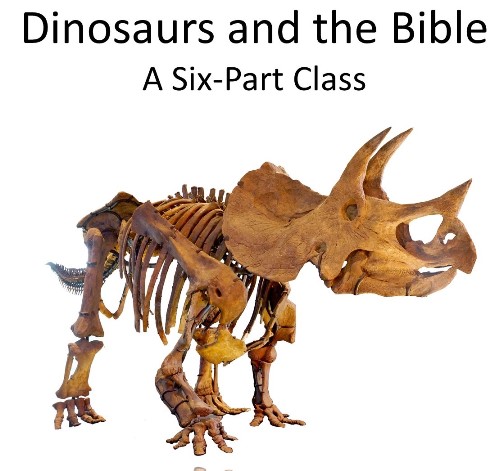
Northwest Treasures ~ Dinosaurs and the Bible (An online Geology classreview)


Northwest Treasures is a nifty little niche company (based in Washington state) that offers online and live classes in geology, as well as field trips and educational kits, all with a Biblical Worldview. We were offered two of the online classes to choose from for the purposes of this review: Dinosaurs and the Bible, and Geology and Apologetics, as well as Taking the Mystery Out of Geology. I chose Dinosaurs and the Bible, as I figured it would have the broadest appeal for our family, although we are all interested in Geology, rockhounding and such. (I seem to have passed on my interest which was definitely nurtured by growing up in the fossil and rock rich state of Montana, with a history buff for a father, and a rockhound for a grandfather. ;) )

Here is a trailer to give you a feel for this particular class:


Trailer of the Dinosaurs and the Bible class from Patrick Nurre on Vimeo.

Each lesson runs around 20 minutes, and comes with a worksheet (Set of 8-13 questions) to check comprehension and retention of the information found in the lesson. These worksheets are a little tricky to locate, so here are some instructions (that I think could be included on the course page).
When you are logged in (on a computer), there is a list of lessons with a "watch" button following each one. It isn't clearly obvious that the lessons themselves are clickable links that bring you to an overview of the lesson and links to the worksheet, and answer key (the answer key only needs to be downloaded one time, as it covers all 6 lessons). 

The final lesson also includes a 15 question multiple choice exam that covers information from the entire course.

The lessons are pretty much Vimeo powerpoint slide presentations (We watched on our TV via the Vimeo Roku channel, but you can also watch in a browser on your computer or tablet), with narration/instruction by Patrick Nurre. Through each of the videos, Patrick discusses the differences between Secular Paleontology and Christian Geology, always bringing it back to the framework of the Bible, as well as pointing out inconsistencies promoted by Evolutionary theorists and noting when Science becomes confused with Philosophy...

One of the things I particularly appreciated was the placement of the scientists in historical and geographical context, which helped to explain some of their philosophy and personal opinion/conjecture. The lessons progress from general discussions of the modern secular view of dinosaurs (and how it came about), their classification, to discussions of the catastrophic events that would have caused their demise and fossilization. All very interesting and intriguing for both my 11-year-old and myself. The lessons are:

  • How We Got Our Modern View of the Dinosaurs 
  • The Classification of Dinosaurs
  • The Great Dinosaur Rush
The first three segments are more historical/technical aspects of the discussion, the terms, and classification. The last three highlight the Biblical answer of "how" the extinction occurred, and the fossils were created... something that eludes those who hold a secular view, but so simply explained in the Bible. 
  • The Extinction of the Dinosaurs
  • Dinosaurs and the Ice Age
  • Fossils, Age, and Soft Tissue
I particularly enjoyed the last two lessons, as they referenced my home state, Yellowstone National Park, the Gallatin Valley, and other National Parks we visited last year as a family including Devil's Tower and the Petrified Forest. I grew up hunting for fossils (Although sadly I don't know what happened to the trilobites and others that were discovered on hikes and outings as a kid) and petrified wood. Thankfully I still have the chunks of petrified wood that I found as a kid in the Gallatin Valley. 

my petrified wood, crystals, and a piece of jewelry created by my rockhounding grandfather

I mentioned the worksheets at the beginning of this review, and I would suggest that if you are using them with kids on the younger age that they are printed up and used as a note-taking exercise while watching the video. Older students could use them as quizzes...


Taking the Mystery Out of Geology clarifies 13 terms that are frequently used in the field of Paleontology and Geology and shows how Science, History, and the Bible really do go together. 

As mentioned at the end of each of the video lessons, Northwest Treasures offers kits and hands-on material to enhance the lessons, and they also offer field trips to those fortunate enough to live in the Northwest, and/or those who have funds to travel for school. My father had moved out to the Glendive area where the Dinosaur and Agate Expedition tour takes place, and I would highly recommend anyone able to participate to do so. The Glendive Dinosaur and Fossil Museum doesn't get the press of the Creation Museum, but it is actually a larger facility and extremely close to the dinosaur site digs. We found it fascinating when we were there in 2016, and would have loved the opportunity to go to the fossil fields (weather and time constraints did not permit...). 

Glendive Dinosaur and Fossil Museum

I understand that they offer some classes on SchoolhouseTeachers.com, and while I haven't personally used/checked those out, if you have a membership and are interested in Geology, I expect they are well worth checking out. ;) 


Not So Nutty Nitty Gritty 
Visit Northwest Treasures on their Social Media Channels on Facebook and Pinterest 

Please click the banner below to visit the TOS Homeschool Review Crew and see what others had to say about this and the other two courses. As always, I hope that this review was useful to you as you choose where best to spend your homeschool budget.
Blessings~

Online Geology Classes{Northwest Treasures Reviews}

Crew Disclaimer
#hsreviews  #geology #dinosaurs #apologetics

Thursday, May 24, 2018

Home School Navigator (Reading/Language Arts Curriculum Review)

We've been checking out the interactive notebooks by Home School Navigator for the past few weeks. They are part of the overall Home School Navigator Reading and Language Arts Curriculum which offers 6 different levels of instruction which are indicated by color, with Red, Orange, and Yellow indicating earlier learning, and Green, Blue and Indigo more advanced. The interactive notebooks are included in the upper levels, and are what my review will focus on, although I will also give an overview of the whole program.

So, what is an interactive notebook? Well, it's a notebook with shapes and flaps that provide a more interesting and interactive way for your child to record their answers to comprehension and discussion questions about a particular chapter book instead of simply filling in blanks or writing on a plain sheet of paper.

Home School Navigator has placed their discussion questions, vocabulary words and comprehension questions into simple graphic formats that are then glued onto a notebook page and filled out. When you become a Home School Navigator subscriber, part of the monthly handouts includes the graphics for the Interactive notebook. You can see below a screenshot of some of the pages we used for the Because of Winn Dixie Interactive Notebook, which is found in the handouts for Month 6 of the Blue Level.


As your child reads through the book, there are items to fill out for every 4-5 chapters.
I recommend printing on colored paper if you have it, as it helps to add interest for most kids. :) Here is what our printed pages looked like before they were put into the notebook.
You don't need anything crazy~ I chose to use a wide rule, spiral bound notebook for my son's work.
A note: Know your children, and even if you think they know what they are doing, check in on them... ;)  Because my son is on the upper end of the age range, I figured he could take ownership of this activity more or less on his own. I handed him the pages, instructed him to cut out each piece and showed him how to glue them down. The pieces are flat with a dotted line where you fold the page up to write the answer beneath. I showed my son that you only glue down the part that is above the dotted line, but he got a little confused a couple of times~ you can see the orange pieces were folded the other way and glued down the wrong way... oops... These pieces are a little different from others we've used before with a similar idea. :) Another thing that wasn't in the instructions, but that I added was to draw around the edge of the shape so that when the flap was lifted he would know his boundaries for writing.

This set of pages shows vocabulary and discussion/comprehension questions with flaps up (kind of) and down.


And here you can see that there are a few pieces included that are informational (middle blue strip), and another that requested an illustration rather than an answer.

If your children are hands-on and enjoy cutting and pasting, this would probably be a hit for them. My son, sadly, is not in that camp. However, this was very good for him to continue practicing his cutting skills, which he generally avoids like the plague (no worries about important papers being turned into snowflakes by HIM! ;), and we had a few discussions that were interesting.
I will say that I do wish that the Master Book List was readily available to the public, as I am very picky about book choices in my home, and want to know up-front what the focus will be. I am sure there are other families with a similar wish. There were definitely chapter books in the upper levels that were not as good a fit for our family, so it was a little difficult for me to find one to use with my son at the appropriate level.  We had a false start with "The Invention of Hugo Cabret" which I thought he would enjoy, but freaked him out instead... (he has a bit of a phobia about robots which translated to the automaton in the story, which I didn't expect), and we ended up with "Because of Winn Dixie" as you could tell.

OK, that being said let me give you a quick glimpse of the rest of the program, even though it wasn't the focus of our particular review (I contemplated switching our focus, but chose not to as many of the books used were books that we had already read/studied/discussed, and that would not have been a good use of our school time~ another reason to make that book list public...),

Each level is broken down into 9 months of work. Each month focuses on a different genre of writing, including:

  • Author Studies (Usually two or three in each year)
  • Biography/Autobiography/Memoir
  • Fables/ Tall Tales
  • Folk tales/ Fairy tales
  • Historical Fiction
  • Mythology
  • Nonfiction Texts/Persuasive Texts
  • Poetry
  • Procedural Texts
  • Realistic Fiction
  • Traditional Stories
Here is a look at the basic scope and sequence which can be found on the FAQ page 


You can see that there is a lot more to this program with a focus on many reading and writing skills. The monthly handout download I mentioned above is a good thing to skim through to give you a bit of an idea of what the month will hold.

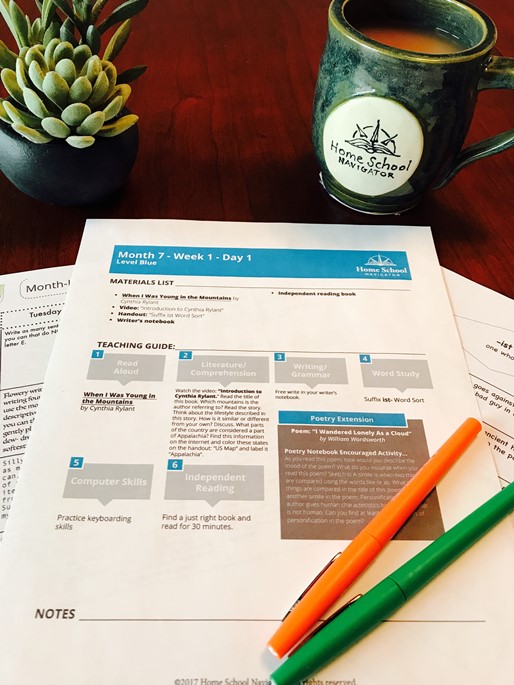
The next item you will want to download is the weekly guide which shows everything you need for each day, each week as well as a breakdown of the day's activities. *Note: You don't have to do EVERYTHING for every day~ this is a "Buffet" of activities~ pick and choose what will work best for your own situation...


You can print these or just use them from your computer.

The rest of the program is accessed from the student dashboard. Each day has a bunch of buttons, for lack of a better word, that are clicked on in order, with all of the instructions and links required. If you haven't already printed out the month's handouts, they are linked individually here as well.


Almost every section includes a video with your child's guides (Ashley and Beth) showing them what to do, and explaining things along the way. This could be very helpful for the new homeschooling parent.

One other item that may be of interest to some parents is the fact that you can upload your child's work to the website, and they will save it/compile it into an end-of-year portfolio (there are reminders to do just that at the end of the daily teacher's guide).


Not So Nutty Nitty Gritty 
Please click the banner below to visit the TOS Homeschool Review Crew and see what others had to say, especially if you are more interested in the actual day-to-day use of the program, because many others focused on that in their reviews. As always, I hope that this review was useful to you as you choose where best to spend your homeschool budget.
Blessings~
Click to read Crew Reviews
Crew Disclaimer
#hsreviews  #readingsuccess    #readingstrategies   #makinglifelonglearners

Monday, May 14, 2018

Kids Email (An email provider review)

If you have been reading my blog for a while, you may recall a review in September 2106 for Kids Email. We have once again been provided a one year subscription to Kids Email Safe Email for Kids for review. My Youngest was delighted with the prospect as we do follow internet safety regulations, and will not allow him to have his own email from any of the generic email providers until he reaches their required age (typically 13, I believe).


We also were quite happy that we were offered this review, as it is a good primer for him, and it also allows him to keep in touch with some friends as well as send us emails. It also provides him a way to move some things he's been writing on the ipad (via attachment or even copy/paste) to a computer. He's begun writing stories and a potential chapter book, but he needed a way to get it to a computer, so this was perfect! ;) ).

Some of the features that make Kids Email stand out as a great option for younger children:
There are many settings and features that parents can use to help keep their children safe and still allow them the freedom to communicate with family and friends.

  • Contact Manager~ Add family and friends to a contact list. 
    • Safety Settings 
      • Receive email for contact list only (yes/no)
      • Send email to contact list only (yes/no)
      • Allow child to edit contact list (yes/no)
  • Block Senders~ If there are no contact restrictions in place, you can still block specific senders by blacklisting the emails. 
  • No Ads~ Even if there are no contact restrictions in place, your child will never generic ads generated from Kids Email, because they don't offer advertising on their site. 
  • Spam Filtering ~ Again, if there are no contact restrictions in place, Kids Email filters out spam. 
  • Mail Monitoring ~ exactly what it sounds like 
    • Safety Settings
      • Send parent copy of incoming email (yes/no)
      • Send parent copy of outgoing email (yes/no)
      • Allow images in incoming email (yes/no)
      • Allow links in incoming email (yes/no)
      • Allow attachments (yes/no) 
        • This can be customized to specific attachment types
      • Filter bad words from received email (yes/no)
      • Add Tagline to bottom of message to alert recipients that email was sent by a child (yes/no)
  • Mail Queue ~ intercepts emails that fail safety rules~ notifies parent who can then approve or deny the email
    • Safety Settings
      • Send a notification to sender to let them know their email has been delayed, pending parent approval. 
  • Time Restrictions ~ You can choose to restrict the time of day or day of the week that your child can access their email. 
    • Activity Log shows when your child has logged in, or if they attempt to log in during a restricted time. 
  • Custom Mailbox Folders~ Child can create their own customized email folders~ helping to teach organization skills. 
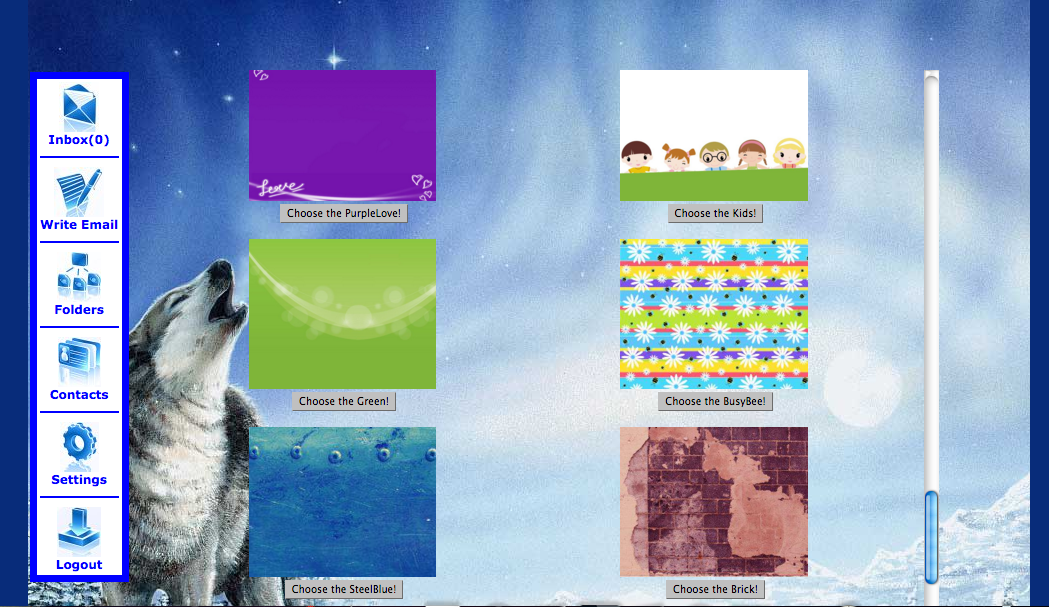
  • Template Options allow your kids to change the way their email looks, which can be a fun option. There are 36 templates to choose from and there are appropriate templates for all ages, even teens! 

This is my son's current template, with some of the other options available shown
If you child has been begging for thier own email, and you have been hesitant because of all the the junk out there, Kids Email might be something you'd like to look into.

If you have a teen that has problems being responsible you can set them up with a @kemail.org address, so that you can help guide them/monitor them without their worrying about a "kidsemail" address~ because we all know that wouldn't go over too well... ;)

Not So Nutty Nitty Gritty 
  • Company: Kids Email
  • Product: Kids Email Safe Email for Kids
  • Ages: 
  • Price: 
    • 30 day free trial
    • $2.99/month billed annually ($38.95) for up to 6 email accounts
    • $4.95 monthly for up to 4 email accounts
Visit Kids Email on their social media pages; 

Please click the banner below to visit the TOS Homeschool Review Crew and see what others had to say. As always, I hope that this review was useful to you as you choose where best to spend your homeschool budget.
Blessings~
Click to read Crew Reviews
Crew Disclaimer
#hsreviews  #parenting  #kidsemail  #emailforkids  #safety #kidfriendly

Thursday, March 15, 2018

NatureGlo's eScience MathArt Online 4-Class Bundle (Review)


When the opportunity to review NatureGlo's eScience offering of their MathArt Online 4-Class Bundle arose (shortly after my college Art Ed major Eldest was sending us YouTube videos on Fibonacci from her math class), I thought the timing was rather fortuitous. And since my Youngest enjoys watching a variety of videos, and Art, and Science, and Math... we looked forward the opportunity to explore the Math Connections with the Real World class from the Bundle.


I will say right off the top that these classes are geared towards Middle and High School aged students, so Youngest is a little over his head with these, but I decided it was worthwhile to let him go through the classes (to some degree at his own pace), and glean what information he could at his own level.

The timing of this review was also interesting to me because our local Science Museum currently has a Fibonacci and Golden Ratio exhibit that we were blessed to go visit with some friends. It was a fantastic reinforcement as my youngest was familiar with the concepts, from the first few lessons in the class we were using, and the hands-on activities there helped to cement some of the concepts of how connected Math and Art (and Science) truly are.
Museum of Science Mirror Maze
Some basic information:
The classes in this bundle are
  • Math Connections with the Real World 
    • Introduction and history of the Golden Ratio and Fibonacci Numbers
    • The Golden Number and Fibonacci in Art, Architecture and Nature
    • Fibonacci Numbers - Flower Petals, Seed Heads and More! 
    • History and Golden Ratio of the Great Pyramid of Egypt
    • Quasicrystals and the Golden Ratio
    • The Mathematics of Music
  • MathArt in Ancient Cultures
    • Ancient Babylonians and Plimpton 322
    • Ancient Greek Math and the Platonic Solids
    • Pythagoras and the Music of the Spheres
    • Ancient India's MathARt: Rangoli, Mandalas and The Story of 1-9 and 0
    • Zellige Moroccan Tiles and Other Tesselations
    • Maya MathArt
  • Mathematics in the Arts and Sciences (I) 
    • Renaissance Artist Piero della Francesco
    • Aboriginal Art
    • Celtic Math Art
    • Patterns in Nature I
    • Branching/Fractal Patterns in Nature and Technology
    • Fractals in Nature and Technology II
  • MathArt Patterns in Nature (Not yet uploaded) 
    • Patterns in Nature: Animal Coat Patterns
    • The Geometrics of the Universe
    • Patterns in Nature: The Hexagon
    • Logarithmic Beauty of the Chambered Nautilus Part I
    • Logarithmic Beauty of the Chambered Nautilus Part II
Gloria Brooks is the Owner/Instructor of NatureGlo eScience, and has been teaching since 1997. The online classes are her newest way to reach out to homeschoolers, and are offered as both live and self-paced classes (with some of them utilizing recordings of the live classes). 

As I mentioned above, we mainly walked through the Math Connections with the Real World class, but I took a look at Mathematics in Art and Science as well. Here is a quick run-down of how it looks to work through a class.

After logging in you are taken to a student dashboard. You click on the course that you want to take, and it opens to a page that looks something like this...


Off to the side each lesson can be opened and each section in the lesson shows up. The section are check-marked and lined out as they have been completed. Simply click on the
lesson you want to go to and a page will open up for that particular section of the lesson.


When the student has completed the activity, be sure to click the button that says "Mark Complete" (We forgot to do that for the first few activities... oops!), and then move on to the next part of the lesson.

When your student has completed all of the activities in an entire lesson they will receive an "achievement" graphic.

If you want to get a good feel for NatureGlo's eScience classes, you can visit the website and take advantage of the Free Fibonacci Numbers in Nature lapbook (part of the MathARt curriculum)

If you click on the  "Free Sample Class" Beluga Whale that shows up when you hover over the Class Catalog Tab you will find another sample of what a lesson might entail. Gloria Brooks talks about the Beluga Whale lesson, as well as shows some of how it is set up, with videos, and study guides. If you scroll further down the page you can access a three-lesson class which includes a sample from the MathArt Classesas well as some of the other classes offered :
  • MathArt – Fractals: Infinite Patterns of the Universe
  • Herpetology – Glass Frogs: Transparent Living Jewels (again)
  • Marine Biology – Deep Sea Fish: Gulper eel, Slender Snipe Eel, Barreleye, Oarfish
A note about the class we focused on. I was a little disappointed in the narrated slideshow videos, as they were strictly narrations of the slides. There was no extra information given, as I might have expected from a power point presentation. I was happy to notice when I checked out one of the other classes that the power point presentation was the spine, but that there was additional information that added interest to the slides beyond just reading what was on the page.

I will also say that most of the graphics (the majority of which are lovely and well done) and activities are available on the internet, however, what makes these classes useful is that Gloria Brooks has compiled all of the information for you in one place, and set it up them up in a logical and cohesive manner. The amount of time it would take a typical homeschooling parent to do something similar would be rather onerous.

If you're looking for a less traditional approach to middle/high-school science,  with an artsy or mathy (is that a word? it is now... ;) ) you may wish to visit NatureGlo's eScience web page, and also read some other Homeschool Review Crew opinions. I can say that this class has given my 10 year old a familiarity with the Fibonacci numbers, and the Golden Ratio, which is more than many kids who've graduated high school have, so I take that as a win.


Not So Nutty Nitty Gritty 
  • Company: NatureGlo's eScience
  • Product: MathArt Online 4-Class Bundle
  • Ages: Middle-High School are the target audience
  • Price: Bundle is currently $536.40 (which is 10% off of a one year subscription. The classes are also available individually for $149.00 each
You can visit NatureGlo's eScience social media pages on Facebook, Twitter, Pinterest, Google+, and YouTube.

Please do click the banner below to visit the TOS Homeschool Review Crew and see what others had to say. As always, I hope that this review was useful to you as you choose where best to spend your homeschool budget.
Blessings~
Click to read Crew Reviews
Crew Disclaimer
#hsreviews  #escience #natureglo #math

Wednesday, October 18, 2017

Reading Eggs (Reading Eggspress Review)


I reviewed Reading Eggs with my Youngest as a beginning reader a couple of years ago (Whoops! Make that review 5+ years ago~ man time flies!), and it was one of the programs that he really enjoyed, even asking as recently as this year if he could use it, even though he had surpassed the age range/reading ability of the main program. ;) YOu can imagine he was very pleased to be on the review again, so that we could try out the program for older elementary students, Reading Eggspress. If you aren't familiar with Reading Eggs at all, here is a quick rundown of the basic programs they offer:

  • Reading Eggs Junior for 2-4 year olds (pre-readers)
  • Reading Eggs for 4-7 years old (beginning readers) 
  • Reading Eggspress for for 7-13 years old (fluent readers) 
  • and their non-reading program, Mathseeds for children aged 3-9

I received a 6 month subscription to Reading Eggs, which allowed me to access every part of the program. Reading Eggs is offering Homeschool Review Crew readers a four week Free Trial if you click through this link, so that you can check them all out as well, if you have children in the 2-13 year old range.

Program Set up
Your child will take an placement test when first accessing the lessons (which is probably the only difficulty we've had~ my son took the test on the ipad, and wished that there was a "submit" button for each problem, as a couple of times his finger slipped and hit an answer that was wrong, but it submits automatically, so he ended up in a level that may be a bit below his actual abilities. However, that being said, I appreciate the level he ended up in, as he is learning to be more careful with his answers. ;) If I was truly dissatisfied with his level, Reading Eggs offers the ability for the parent to adjust the level manually or have the student take the placement test again. This is true for the reading and math programs both.

Sample placement test question. Test continues until 2 questions are missed
Once the placement test is taken, your student can continue directly to their Reading Eggs dashboard where they can access the various areas of the program.


The central location contains the meat of the program, the Lessons. Each Lesson contains 9 or 10 activities that must be passed in order to continue to the next lesson on their map. Parents can keep track of progress on the parent dashboard as well as through progress reports sent directly to their email.
  • English Skills contains the Reading Eggs Spelling program
  • The Stadium offers the opportunity to pit their knowledge in Spelling, Grammar, Vocabulary, or Usage against other Reading Eggs users across the world. 


  • The Library contains a variety of books to read, and each book comes with built in comprehension quizzes. I would recommend keeping an eye on the books your child is reading, as there may be those that you wouldn't care for your child to read (one of the "books of the day" highlighted in the library the day I chose to take screenshots for this review was "The Trouble With Boyfriends" ~ not exactly what the target age for this program should be reading in my opinion, but to each his own... The other book of the day was on Railroads, so would be much more appealing to my 10 year old son. :) ) 

The library allows kids to browse a variety of reading genres and search for topics, but again, be aware of what they are choosing. ;) As with any library there are good books and twaddle..


Extras at the back of a book on the Civil War

  • Targets offers challenges to help students make use of the various aspects of the program
  • The Mall, the Apartments, The Trophy Room, and the Arcade are the "fun" parts of the program that let your child utilize his accumulated points (reading eggs earned by reading and answering questions)  This is one of my son's favorite things, and his incentive to do more than I ask each day. :) 
In addition to the electronic program, Reading Eggs offers printable bonus materials. 

  • Activity sheets that correspond to each lesson for Reading Eggs and Mathseeds  (Homeschool Worksheets with an overview for the parent instructor and printable worksheets to reinforce each lesson, and Color ) and Reading Eggspress (English comprehension and Spelling Worksheets that correspond to each lesson).

  • Parent User Guide which shows how to use the program and contains Lesson Overviews (scope and sequence) for Reading Eggs and Reading Eggspress.

  • Homeschool Program that offers a schedule for the whole year for grades K-2 covering Reading, Math, Science, and Social Studies, utilizing books in the Reading Eggs library of over 2500 titles.

While there are a few books/topics I would prefer to weed out, by and large, I appreciate the approach to phonics (which thankfully main stream education is coming back to), comprehension, and basic reading skills. 

If this is something you are interested in, you have nothing to lose by signing up for that Four Week Free Trial mentioned at the beginning of my review. 

Not So Nutty Nitty Gritty 
  • Company: Reading Eggs
  • Product: Six Month Subscription Reading Eggs Products
  • Ages: 2 years old - 13 years old
  • Price: 
    • 6 month subscription: $49.95
    • 1 year subscription: $59.95
    • Discounts for 2nd and 3rd children using the program (50% off)
You can visit Reading Eggs on their Social Media Pages:
Facebook, Instagram, Twitter, Pinterest, and YouTube

Please click the banner below to visit the TOS Homeschool Review Crew and see what others had to say about Reading Eggspress, as well as Reading Eggs, Reading Eggs Junior, and Mathseeds. As always, I hope that this review was useful to you as you choose where best to spend your homeschool budget.
Blessings~
Click to read Crew Reviews
Crew Disclaimer
#hsreviews #readingeggs #learntoread

Followers

LinkWithin

Related Posts with Thumbnails