Showing posts with label 2012/2013 Homeschool year Reviews. Show all posts

Monday, June 17, 2013

Memoria Press: Geography I


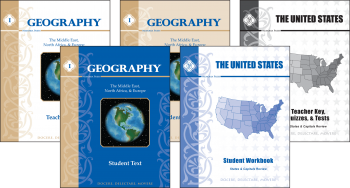
My Middlest got a review of his own to enjoy~ Geography I by Memoria Press , a pack of 5 softcover books~ a Teacher Guide (mostly an answer key), a Student Text and a Student Workbook that cover The Middle East, North Africa, and Europe. Included as a bonus are The United States Student Text and Teacher Key (Which we did not use for this review, but based on response, are likely to use!).

Middlest enjoyed the format of the Student Text~ which is really an "Introduction to Geography" that can be used with children from 4th grade on up.
You can download the table of contents from the Geography I page along with some  samples (I'm including screenshots of a couple, to give you an idea of what it looks like inside).

Friday, June 14, 2013

Birdcage Press: Art Close Up Game (Museum Of Modern Art)


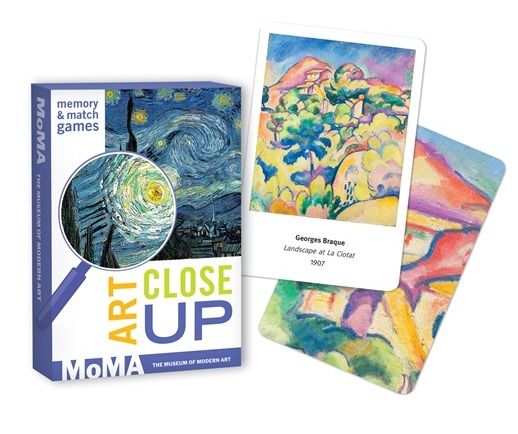
My kids love it when we get fun things for review! I love it when they have fun, and get to learn at the same time! Birdcage Press produces a wide variety of "Art" "Wildlife" and "History" games, and they sent the TOS Crew a variety of Go Fish style games as well other card games and a lotto style game. We received Art Close Up: Museum of Modern Art.

The deck of 48 cards includes works by 24 artists. Each artist has a main card that shows the entire work, with the artist name, title of the work, and the year painted.  Another card is the "match" for that card, but it is only a portion of the painting "Close Up."  This is great for training the eyes to look for detail!

There are a number of games that can be played using these cards. Of course there is the traditional "Concentration"  or in this case "Art Memory," which my children played first because it was a familiar game. They particularly enjoyed playing it the first few times as they really had to look carefully to discern whether the cards were a match or not (for the record, this was Eldest's favorite game to play with these cards).

Friday, June 7, 2013

Math Mammoth Light Blue Grade 1


My little math boy has gotten quite a lot of practice this year! Our latest offering was the Light Blue full year curriculum 1st Grade from Maria Miller's Math Mammoth  program. We received the downloaded pdf version of the program (it can also be purchased as printed workbook, or on CD). 
This worked out well for us as littlest enjoys doing worksheets via the pdf-notes app on my iPad. I like it because it reduces the number of papers floating around our house, AND it saves on ink and paper. If you don't have access to an iPad, you may be happy to know that the PDF's in the download version are enabled for annotation and can be filled in directly on the computer if opened in Acrobat Reader version 9 or higher. 

From the website: The four main areas of study for first grade are:
  1. The concepts of addition and subtraction, and strategies for addition and subtraction facts (chapters 1-2; chapter 4);
  2. Developing understanding of whole number relationships andplace value till 100 (chapter 3 and chapter 7);
  3. Developing understanding of measuring lengths as iterating length units (chapter 6); and
  4. Reasoning about attributes of geometric shapes, such as the number of sides and the number of corners, and composing and decomposing geometric shapes (chapter 6).

Wednesday, June 5, 2013

See the Light art class Pointillism (Fruit?)


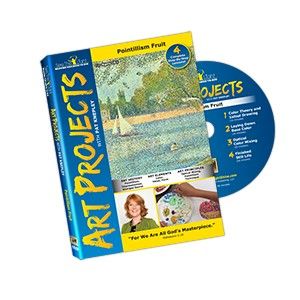
We have enjoyed using See the Light in the past, and I was very pleased that we were able to review another Art Project. This time it was 4 lessons on Pointillism (Fruit) in the style of George Seurat. Each lesson runs between 20-30 minutes or so, and additional time is required in order to do the actual painting, so each lesson ideally will last about an hour.

I decided that we would ALL complete a project, and it was very interesting to see what happened.

My 5 year old decided to paint some wooden fruit.

The classes are very thorough and step-by-step, so that as you can see above, my 5 year old was able to come up with a very nice piece of art, even when following along with a class intended for 10+. He didn't get into the shading, highlighting and shadows that were in the later lessons, but I was very pleased with the outcome. 

My 12 year old started out thinking he would paint some sports balls, 
but ended up going ahead with the fruit instructions.
He began to be very impatient with his drawing ability, but as you can see, by the time he was finished, his fortitude bore fruit... (Pardon the pun...8^D ).

My 15 year old wanted to try out a floral painting, 
so she pulled together some flowers from a couple of photographs.
Not precisely following directions, 
But hey, she's 15, and she's old enough to experiment on her own...
more on that a little further on. :) 
  • First lesson~ Color Theory and Initial Drawing
  • Second lesson~ Lay Down Base Color with Dots
  • Third lesson~ Optical Color Mixing with More Dots
  • Fourth lesson~ Highlights and Shadows for Finished Still Life 

(she got the highlights, but there were no shadows in those photos~ she also used a deep purple tulip from our yard, in place of the white one in the photo)


I opted to follow suit and do a floral as well, rebel that I am... 
(and because my 12 year old didn't want me to do a fruit still life to compare with his ;)).
I didn't do the fun "play with the flowers in the app" bit that my eldest did, I was just experimenting some on my own as well. :) 


We all appreciated hearing about Georges Seraut, and the science of color and light that he studied as he played with tiny points of paint. I was less excited with the concept of using only the 6 primary and secondary colors, as I was totally unable to even slightly represent that vivid magenta color in the primroses~ I'm guessing that occasionally the Impressionists mixed a few pigments to help them approximate some of God's amazing coloring... ;)


The photo to the left is evidence that once again the 15 year old didn't strictly follow directions, and opted to use a palette, rather than waxy paper plates (that was more a function of economics~ we had the palette in house, but no paper plates...), but... isn't it pretty? And a bit of an accidental study in complimentary colors, too!


The whole art history (and science) lesson was very intriguing, and eldest and I  both learned a bit more about the color wheel than we knew before. We are both interested in experimenting and finding out more about how colors work next to one another.

Eldest decided to take on a landscape from one of our vacation photos~ 
rather fun~ still a work in progress ~ 

As a parent, I love that the class is taught *for* me~ and I enjoyed painting along with the kids. I also love that Scripture is woven throughout the lessons, because God is the ultimate artist, and His character is shown in so many ways. 

As a teacher, I appreciate that things are set up the way they are for a purpose. Because I had children who didn't want to follow the lesson to a "T" we had a little bit more frustration. In hindsight, I can clearly see that there is a reason that this lesson is painting fruit~ generally apples, oranges, pears, and bananas are fairly uniform in color, which makes for a simpler first try with pointillism, rather than attempting to figure out more complex colors and shading (even though a fruit, the mango was a bit tricky~ note that it wasn't one of those suggested!). 

As Students, my children generally enjoyed Pat Knepley's lessons, but the older ones certainly didn't always like to follow the directions, even when they were to their benefit. However, as can be clearly seen by my daughter's continuing interest, the lessons ARE engaging and instructive. 

This is also a great exercise in focus and patience ~ particularly if your child is more of a Jackson Pollock type of artist. 

Side note~ the supply list notes 50 cotton swabs~ you might require more than that if you have more than a couple of people doing the project... so plan that trip to the drugstore accordingly! 

Not So Nutty Nitty Gritty 
An ideal set-up would allow for 1/week, which means that taken with the other See the Light Art Projects, you could have a year+ worth of art lessons, right from the comfort of your own home. Please click the banner below to visit the TOS Review Crew to see the experiences of the rest of the Crew as they explored this art project as well as many others!  As always, I hope that this review was useful to you as you choose where best to spend your homeschool budget.
Blessings~


Photobucket

Thursday, May 30, 2013

Simplified Dinners/Paperless Home Organizataion

A homeschool mom's dilemma~ what to do with all the stacks of paper, notebooks, home management journals, to do lists, shopping lists, menu plans... you name it and it's in paper form, I know that *I* at least, am oftentimes SWAMPED with it. Even electronic to do's like my email inbox are out of control.

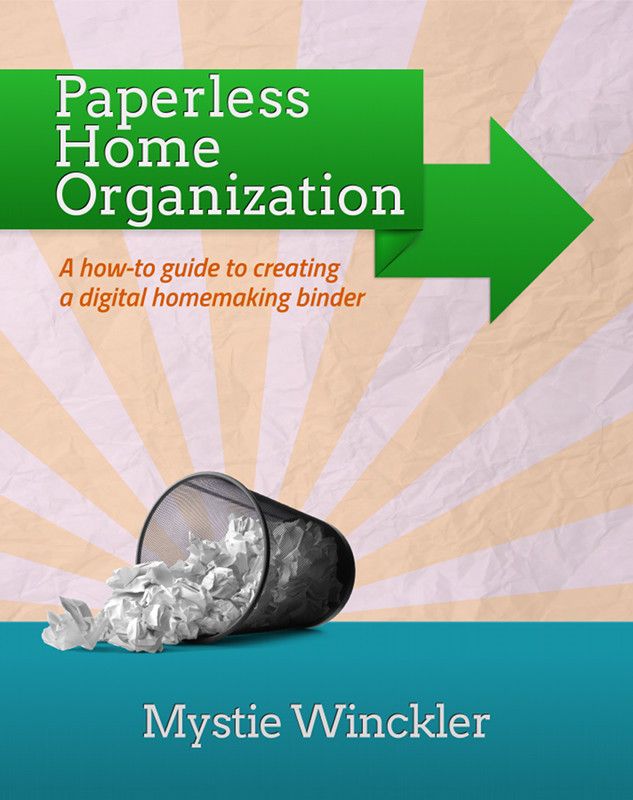
Thankfully, a kind and organized soul has created an ebook manual to help tame the paper monster (and yes... the electronic monster) by utilizing some fairly simple methods, and apps. Mystie Winckler (Author of the Simplified Pantry ebooks below) gives us Paperless Home Organization.

I have to admit that it has taken me quite awhile to get going with this system (in part because I get hung up on things like "why isn't my iCal on my computer syncing with the iCal on my iPad with the iCal on Google correctly! I have duplicates, and then I have nothing! ARGH!!! ... see.... sidetracked... whoops!), but even in spite of my sidetracks, I have been able to see some success in paring a few things down through following the tips and ideas in Mystie's book.

True Confession: I am an email hoarder~ I almost NEVER delete emails (Because I might need it some day, right??? Right! It has come in handy being able to pull up a 3 or 4 year old email upon the rare occasion). As a result, my inbox would terrify a truly type A person, while it sometimes causes me to miss an important email amidst all the "stuff." Mystie shows how to use filters and labels and tags to organize even the "junk" that I might want to read if I have a minute, as well as the essential emails. In the space of oh, 30-45 minutes I whittled my "unread inbox" from 131,170-ish emails down to 127,128 emails. (That was just creating filters from emails on my first page. Pretty nifty, right? If I can keep it up, one day I might have a sleek, slim inbox as well (While still keeping those essential archives, just in case... :) )

So~ different things will have a greater impact on different folks. For me, that was a big one. The calendar~ well.. if I could only get the technology to play nice, that would be good as well. Mystie gives more tips and instructions on using the electronic calendar to a much greater potential than I have tried so far.

Now, one thing that I am still working on wrapping my head around is the "Home Organization" part of this system. It entails the use of a couple of applications, with fairly detailed instructions, but I have bogged down in a couple of places. Evernote is the major application being used, and I have only just begun to utilize it, with help from Mystie, whose organizational skills far surpass my own.
She details how to set Evernote up to store homeschool information and even portfolios, recipes and menu organization and so much more.

For someone who has been bogged down for years I can almost promise that it's going to take *me* months to get things all in place and organized, because it DOES take some time to implement any sort of "organization" virtual or otherwise. I am hopeful that this is a system that might work for me (*if* I can get into the habit of doing certain tasks every day~ yep... that's definitely a part of my problem~ consistency). ;) Having this manual is like taking a class in electronic organization~ without having to find childcare, or leave your home!

The  Review Crew received a couple more ebooks from Mystie to review and check out~
Simplified Dinners and
Simplified Dinners Gluten Free/Dairy Free

These are  both fairly concise ebooks (30-33 pages) but they are jam-packed with some great ideas~ the basic concept is to "simplify dinner" by using a basic type of meal, and then giving variations on the dishes, so that you don't feel like you are cooking the same thing over and over.

If you want to get a feel for the way the books are set up, you can download a Simplified Dinners Sample and a Simplified Dinners Gluten Free/Dairy Free Sample. The samples include
  • The introduction
  • The master pantry list
  • Recipe variations for one of the 16 meal types
The meal types included are:
Slow-Cooker Roasts                                 Slow-Cooker, No-Defrost Chicken Pieces
Chicken-in-a-Pot                                      Skillet Cutlets with Pan Sauces
Marinades for Grilling or Broiling           Foil-Packet Fish
Stovetop Pasta                                          Bean Pots
Lentils over Rice *GF only                      Fajitas
Quesadillas                                               Taco Bar
Burritos or Enchiladas                              Taquitos
Frittata                                                      Oven Omelette
Pizza *not in GF                                       Simple Stir-fry
Potato Hash                                              Baked Potato Bar
Bean Soups                                               Stews
Blended Vegetable Soups                         Quick Soups
Main Dish Salads                                     Vegetable Side Dishes
Side-Dish Salads                                       Starchy Side Dishes
Gluten- & Dairy-Free Desserts*GF only

Many of the ideas (For instance, the Stovetop Pasta Dishes) are ones that I already use, but I sometimes get in a rut, and this is a handy little resource to have around to make it a little easier to help the same meal not taste the same 3 weeks in a row. ;)

I also appreciate the brevity of the instructions~ for the same basic meal (Say, "Blended Soups") the basic stovetop process and the slow cooker process are written down first. They are  followed by each variation. If a certain step is skipped, it tells you, and the only the specific variations are included.  This is how it is possible to get 5 (or more) recipes on one page! Yes short, yes, concise, yes simple, but NOT skimpy! 
I will mention that many of the recipes are duplicated in both books, but if you are GF/DF, you will definitely want to check out that option. Be sure to explore the Simplified Pantry site~ there are a few more recipes included, as well as some techniques and such.
Not So Nutty Nitty Gritty 
For those who purchase both Simplified Dinners and  Paperless Home Organization, Mystie has Simplified Dinners in an Evernote Stack that she will share upon request. If you use Evernote (or decide to after reading Paperless Home Organization), simply email her and ask for the Evernote Simplified Dinners and she will send you the invitation (she can only do it manually from Evernote, so she needs individual requests). 

Mystie is offering a TOS Review Crew discount: when readers enter TOS2013 at checkout, they can receive 30% off! That discount will work on any or all of her eBooks, through June 3rd.

Please click the banner below to visit the TOS Review Crew and see what others had to say (They may have gone more in depth on the Simplified Dinners options, I chose to focus on the HOme Organization). As always, I hope that this review was useful to you as you choose where best to spend your homeschool budget.
Blessings~



Photobucket

Friday, May 24, 2013

Joyce Herzog Budding Authors SET *and* 6 Weeks to Understanding Grammar

I am always on the lookout for something that will catch my reluctant writers' attention, so I was curious to get a look at the Budding Authors series and 6 Weeks to Understanding Grammar by Joyce Herzog, the latest items that I have been sent for review. Educator, Author, and Conference Speaker are just a few of the hats that Dr. Joyce Herzog wears, and her introductions to each book remind me of hearing her at conference, with a chatty little discussion, often background details. (Kind of a kindred spirit there, I think...???)

The Budding Authors series is a group of 5 manuals that starts with the very earliest readers, and continues to increase the writing skill level up through writing a history research paper.

($10)Step Into Writing  (First steps in writing sentences and stories) is set up with 3 styles of lessons~ Copywork, Dictation, and "Experience Stories." The copywork and dictation sentences are very short, but were still a bit of a task for my 5 yo~ would be better for his hands next year, perhaps?  Side note~ it took us a long time to decide how to use the special CPS (Capitalization, Punctuation, Spacing) paper... the spacing is like nothing we had ever encountered before (I would have liked at least one "example" sentence to be included on the first page... it would be a simple thing to add, and clear up any confusion before it begins).

Each page has an old-fashioned illustration, some very clear, but others rather fuzzy. The occasional  lack of discernible detail made it difficult for my littlest to decide what was happening, which was especially perplexing when he was supposed to be narrating the Experience Story, but there were only a few of those, so we just moved on to another page. Because it was narrating, and I have arthritis that crops up when I do much writing, I opted to type his story into a word doc, print it, and insert into the  book~


($10)Step On Into Writing (really stepping into writing sentences and stories) Set up similar to the first book, but with slightly more complex sentences (I didn't see any fuzzy pictures, either!). I forgot to mention above in Step Into Writing that the front of the book includes a page with sentences for the teacher to use for the dictation pages, which is nice, as they are structured at the appropriate level, and the same holds true for this book.
Although a dictionary is mentioned in the front pages of Step Into Writing, it doesn't make its appearance until this book. The dictionary is a picture dictionary of words used frequently in the sentences in the book.

Don't you love the old-fashioned quality of my photos? ;)
Schooling at night, and no flash~ white pages... really!

($10)Adventures in Writing (Short stories in a single paragraph) This is the book I decided to use with my Middlest. The pages are set up with a black and white illustration, two word boxes (one with simpler words, the other more advanced), a set of questions to help the creative juices start flowing, and a space with regular lines for writing. I think the word boxes in particular were very helpful for my son ~  requiring him to use 8+ words in 5+ sentences at a minimum helped to encourage some creativity, although I also saw times where his paragraphs didn't really flow, and were more nonsense strung together just to get the words and sentence count in... ah well.... can't be perfect all the time. ;)

($12)Then and Now (Writing comparisons in two paragraphs) Each page has one of those lovely old-fashioned illustrations with a set of questions for the student to think about, and then answer "What's the same?" and "What's Different?" between then and now.

($15)Writing U.S. History (U.S. History research and report) was beyond the scope of what we were ready to do at this point, but as our history studies continue through this time frame, I can see integrating this course into a "unit." This book touches on outlining and using index cards, and then moves right into the pages~ again with illustrations and a few words with basic information so that the student has a place to begin their research to go with the picture. It starts with the Explorers and ends with pages from the 2010.

($12) 6 Weeks to Understanding Grammar is a fairly brief booklet (40 pages in length) but is packed with great information. It is best used, according to Joyce Herzog with students aged 11 and up (Which flows with my personal philosophy of covering certain subjects later).

Concepts include:
  • eight parts of speech (kinds of words)
  • three kinds of sentences and one variation
  • five sentence completers or complements
  • simple and compound subjects, predicates and sentences
  • the difference between a phrase and a clause
  • kinds of sentences by function (declarative, interrogative and imperative) and the exclamatory variation
  • kinds of sentences by structure (simple, compound, and complex)
There are also a number of helpful appendices at the back of the book including:
  • Capitalization Rules
  • Punctuation Rules
  • Spelling Rules
  • Verbs (tense, forms, variations)
  • Verbals
  • Irregular Verbs
While we have already covered the majority of these concepts with both of my older children, I find this to be a very handy little reference guide or review booklet, when a specific concept needs brushing up a little. For those who have little to no background in diagramming sentences... guess what... that's included as well. As I said at the start~ a LOT of information in a little book!

Not So Nutty Nitty Gritty 
Please click the banner below to visit the TOS Review Crew. While a few of us reviewed these books, there were a variety of other products reviewed including the Scaredy Cat Reading System, Learning In Spite of Labels, and many more. As always, I hope that this review was useful to you as you choose where best to spend your homeschool budget.
Blessings~


Photobucket

Monday, May 13, 2013

Papa's Pearls (Book Review)


As a person who appreciates the personal little stories that make up the bigger picture of our common history, I enjoyed the opportunity to review the book Papa's Pearls by Diane Flynn Keith (my home school friends might recognize her as the author of carschooling.com, clickschooling.com, and homefires.com). 

Diane has written a shiny little book that is part biography (of her father, Papa, who was a Depression-Era child), and part . . . well, pearl ~ using my personal idiom I would say "nuggets of gold" ~ bits of useful information to remember and incorporate into one's daily life and attitude, in order to achieve a "happy life" (I would perhaps use the words "contented and fulfilled"??).

The book is filled with little vignettes from Papa's life, from his time as a "Newsie" in San Francisco when he was 9 and 10 years old~ selling 100 papers/day to provide lunch money for his father to his successful career as a businessman/plumber, to his conversations with his children and grandchildren and their memories of his sayings and wisdom. 

Many of the phrases that Diane shares would be considered common platitudes today, from their casual overuse (platitude is defined as a remark or statement, esp. one with a moral content, that has been used too often to be interesting or thoughtful). However, it is apparent throughout the book, that rather than casual overuse, most of  Papa pearls had more of the impact of Papa developing axioms for his family (axiom~ a statement or proposition that is regarded as being established, accepted, or self-evidently true)through their very regular use. 

The difference for me is in the actual stories behind his words. We've all heard variations on the theme of "When You Fall Down~ Get Back Up, Brush Yourself Off, and Try Again!" but it becomes more meaningful and likely to be instilled as a character trait (perseverance, anyone?) when accompanied by a real-life example, or when used in an appropriate situation. 

I enjoyed reading through the book for the most part. I only had a couple of issues: There was  bit of a sense of "believe it, receive it" in places that doesn't totally jive with my personal philosophy of life, and there is one paragraph with a quote that uses coarse language, as well as one or two anecdotes that walk the line between tricking and lying (I know some folks who would get a huge kick out of those antics, and others who would be offended by them). Taken all-together, these don't make up a significant part of the book, but are worth mentioning~ when I give my recommendation, it's more of an 8 or 9 acorns out of 10... just so we're clear on that. :)

This could be a great book to give an expecting couple, or new parents~ there are many little pearls of wisdom here that would be lovely to read at the beginning of your parenting days. I also find myself taking note of certain stories and sayings I'd like to share with my family and others with friends.

Some concepts are carried out through action:
I especially like the idea of waking each child with a 5-10 minute back~rub each day... that's not the kind of mom I have been per se, but it is the picture of something lovely to aspire to ~ and reminds me of a child-hood friend's mother who "scratched" her children's backs each night~ how delightful to be on the receiving end when I slept over! 

Others are carried out by showing that you support your children, and want to help them make wise decisions:
"Everyone Deserves A Second Chance" and "Tell Yourself You Like It" are just two of the chapters that come to mind~ great stories go with those sayings... I like to think about the scrappy little boy named Carol, growing up in that very difficult time, turning into the incredibly loving, supportive, wise Papa of Diane Flynn Keith

This book made me smile, chuckle a little, and for the most part feel like I was keeping good company and following the admonition in Philippians 4:8 to think on those things that are lovely, commendable, and of good report.

Not So Nutty Nitty Gritty 
  • Company: Papa's Pearls
  • Product: Papa's Pearls book
  • Ages: Adult~ Particularly New Parents (My recommendation)
  • Price: $14.97 via Amazon, or $21.97 (Includes shipping) for an autographed copy directly from Homefires.
Please click the banner below to visit the TOS Review Crew and see what others had to say. As always, I hope that this review was useful to you as you choose where best to spend your homeschool budget.
Blessings~


Photobucket

Wednesday, May 8, 2013

Literacy Soft~ McGuffey Reader App for the iPad

Ever since we have had an iPad in our home, it has been taken over by an incredible number of educational apps (we say the iPad is mine, but I think we know better...). Regardless, it's all good. :) The McGuffey Readers are a classic standby, so I was curious to see how they were treated when I was given the opportunity to review LiteracySoft's Phonics and Reading with McGuffey.

Once you have your user set up, they start at the beginning with lesson 1. I'm just going to walk you through an entire lesson, using screenshots (Mostly from lesson 1, but a few from further on). There is an "instructor" or "narrator" voice that gives direction for each screen in the lesson, and pushing the "Volume" icon repeats them, if necessary.
Screenshot of Lesson 1 Overview, which can be reached from the Table of Contents button on the home screen. Note: It *is* possible to move ahead in lessons via the Table of Contents, if there is material that has already been covered. 


Letter Sounds Screen (Lesson 1) 
Letter Sounds: Each lesson introduces a number of new sounds. In this case, the letters "short a," "hard c," "d," "n," "r," and "t."  The letter sounds are voiced as each letter is touched.

New Words: lists new words, which are sounded out, and then read as they are touched. The reader is encouraged to echo the sounding out and reading of the word (This struck me as a mix between phonics and sight reading). The narrator does mention spelling rules as they come up, but I think those must be pointed out for the younger reader to catch them.

Phonics Flashcards (Lesson 1)
Phonics Flashcards: a "quiz" page, where the reader is to touch the letter that represents the sound being spoken. Each time the answer is correct "light" is added to the a lightbulb. When all 6 lightbulbs are lit, that part of the lesson is over. This is a fast and effective drill, that creates a nice sense of accomplishment.

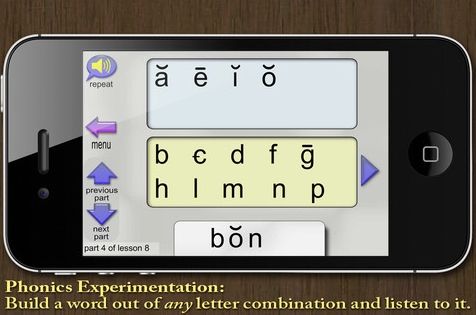
Phonics Blender
Phonics Blender~ This is actually my least favorite aspect of this app, even though my son enjoys playing here. This is a screen where the reader can build a word out of ANY letter combination. They can make real words as well as nonsense words, which is well and good. However, my issue with this is that the vowels are represented phonetically. I am finding causes confusion when working on spelling. There is nothing to distinguish WHY a "long e" is pronounced "EEE." I wish that the vowels were shown with their correct spellings "ee" as they are taught, rather than phonetically. When "ch" and "th" are taught they are represented correctly, and I just wish the vowels were as well.

Moving right along...

Lesson 13 overview with the lesson illustration
*Note~ each section of the lesson
be reached by clicking on the button on the left.
I love that flexibility! 
Lesson Illustration ~ Has a picture that coordinates with the reading practice. There is nothing to "do" on this page, other than to observe what is seen. LiteracySoft offers a free pdf download of the McGuffey Primer which corresponds directly to the app, so you do have the option to reinforce with a paper (or computer) copy if you so desire. I found this handy so that my son could see the Illustration and the Reading Practice on the same page, but I only used it AFTER going through the lesson on the iPad.


Reading Practice (Lesson 12)
Reading Practice~ A set of words are shown. I have my son try to sound them out on his own first. If he runs into trouble, then I have him touch the word he is having trouble with. The program then sounds it out for him, and reads it for him. After than, he starts over, and continues till he gets to the end. He then enjoys dragging his finger across the boxes to hear the words spoken without being sounded out.

Quiz~ is a page that quizzes the reader on the new sounds that were learned. Fairly simple screen, which shows the lesson letters. The "narrator" asks them to touch each letter by sound.

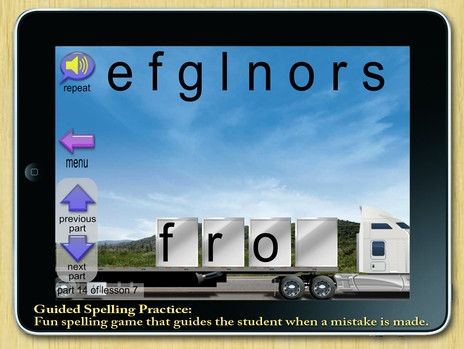
Spelling Practice
Spelling Practice~ Asks the reader to spell a particular word, and they have to drag the correct letters from the sky to the correct box on the flatbed before the truck will drive away, and a new letter will appear. This was fairly simple to start with, but now that we are getting further along, and there are more vowel sounds, youngest is finding that he has to listen VERY carefully to distinguish which one he needs to use. This is a good thing!
    Sight Word Drilling
    Sight Word Drilling~ In this last section, three words from the current (And possibly previous lessons) are shown, and one is spoken. The reader taps it, and the list of words changes immediately, and another word is spoken. The faster the words are tapped, the faster the engine runs. Accuracy counts, though, because a wrong word slows down or stops the engine. At the moment, our goal is for youngest to get through this part of the lesson in less than 100 seconds. Sometimes he zones out or gets flustered by the "timed" aspect and starts tapping random words. At that point I have to remind him to focus, and repeat the word that was said, before tapping it. When he is successful at beating the 100 second mark the first time through there is great excitement and jumping up and down, so I'd say this is a fairly effective tool.


    TOC Lesson "Jump Menu" home page
    All things considered, I am fairly happy with the way this app works, with the exception of the phonics blender~ and I'm guessing there was a valid reason for its inclusion, it just doesn't quite go with my teaching reading philosophy. The good news is that the app allows for any section to be skipped. While this is a very positive feature of the app, some students may require an adult overseeing their use to make sure that too many sections aren't skipped over... ;)

    Not So Nutty Nitty Gritty 
    • Company: LiteracySoft
    • Product: Phonics and Reading with McGuffey
    • Ages: Beginning Readers
    • Price: $19.99 for all 53 lessons (The first 10 lessons are available to download for free, so that you can check it out for yourself!) 
    Please click the banner below to visit the TOS Review Crew and see what others had to say. As always, I hope that this review was useful to you as you choose where best to spend your homeschool budget.
    Blessings~


    Photobucket

    Followers

    LinkWithin

    Related Posts with Thumbnails