Showing posts with label 2014/2015 Homeschool Year Reviews. Show all posts

Wednesday, July 22, 2015

Home School in the Woods: Project Passport World History Study: Ancient Egypt

Home School in the Woods is synonymous with gorgeous, detailed artwork, most frequently mentioned in reference to Amy Pak's History Through the Ages Timeline Figures, which I have appreciated from a distance for years. Up close and personal I have enjoyed being on the Great Empires Review in spring 2013, Olde World Style Maps in winter 2010, and one of my favorites, the New Testament Activity Pak in Spring 2009 (I am anxious to do this with my youngest when he's ready for it... maybe this year!).

Yep, I've been doing this review thing for quite some time, and guess what? Amy Pak keeps coming out with new products to enhance your history studies. While her timeline figures can be used with any history curriculum, the Project Passport World History Study: Ancient Egypt (One of three currently available units reviewed by the Homeschool Review Crew) are stand-alone, activity based studies.


Technical Details:

  • For the purposes of review the TOS Review Crew received the download version of this study. I don't know how it works on a Windows machine, but on my MAC the files were accessed via the Safari Browser. I tended to open up the main page, and then open the lesson Text, the Travel Itinerary (Teacher's guide), and the various pages to print for each project. 
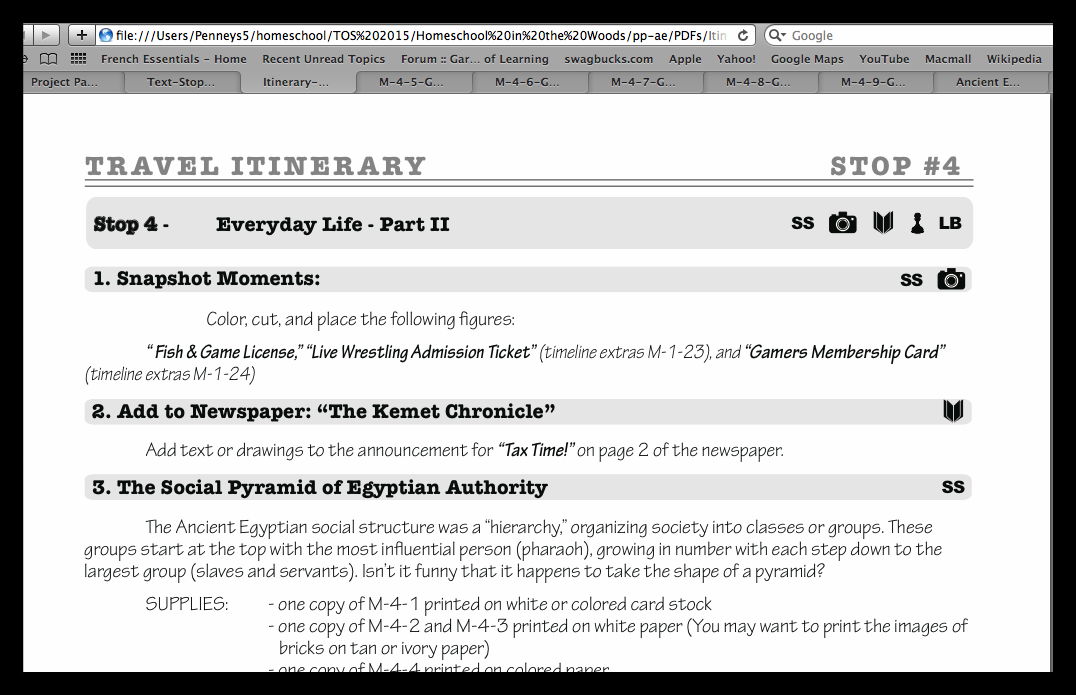
Note the tabs across the top.... ;)
_~-~-~__~-~-~__~-~-~__~-~-~__~-~-~__~-~-~__~-~-~__~-~-~__~-~-~__~-~-~__~-~-~_
  • A Printer and a variety of paper and cardstock are required to print the various files and graphics. 
  • Colored Pencils, glue sticks and double stick tape will also become staples when completing a Project Passport study. 
  • There are a few projects that might require something you don't already have in your home, but sometimes there are also alternative materials given (Or you can adjust like we did, and use what you have...). 
Organizing the Project Passport can take a variety of forms. You can print EVERY last file before starting, you can print the pages required for each Itinerary Stop (Lesson) all at once, or as you go. A virtual trophy to the first person who guesses which way I choose to organize. ;) 

One of the best ways for you to get a feel for the scope of what is involved in a Project Passport is to watch this very thorough video produced by Home School in the Woods:


Because my guy is on the very youngest edge of the recommended age range (Grades 3-8), we have definitely been picking and choosing what we do.

For every Itinerary stop
  • I read the text aloud
  • If there is map-work or timeline figures he adds those in. *Side note for the timeline~ I printed the teacher's key, cut out the provided names and he finds them on the key, then glues them on his timeline. 
  • If there is a postcard, Youngest illustrates it with something that has to do with the message on the other side. 
  • The rest of the activities depend on his level, interest, and what is going on in life as we speed through summer activities as a family. There are a few hands-on projects that didn't jive with our schedule (or the weather, depending...) that he would like to attempt at some time, so we may have an end of unit project week... :)  


This is one young lad that likes that big Egyptian "BLiNg" for the Boys! :) 

Once we started doing this unit my Youngest pulled out some young reading material on Egypt (And he knew the answers to some questions before I even asked them, thanks to that reading...), and decided that he wants to build an Egyptian world on MineCraft~
I'll have to get back to you on that.... ;)

A couple more notes~

  • If your kids hate using scissors and glue, they might not enjoy this as much, but if they like to watch *you* use scissors and glue, they can still get a lot out of it. 
  • If your kids *love* scissors and glue and tape, and all things constructive, they'll probably enjoy this, but they might get frustrated (Depending on age) with some of the fine detail~ mom or dad might just have to step in and help once in awhile. 
  • By and large, the majority of the projects are *not* overwhelmingly difficult. 
  • The quality of the product is fantastic, from the graphics to the content to the audio, and the instructions~ just amazing! 
  • One minor constructive criticism~ I wish that some of the project files were offered as continuous page pdf's as well as singly, so that I could choose to use my duplex printing capabilities when the project calls for double-sided pages... I find that option much easier. However, I'll deal with removing, flipping, and printing if I have to. ;) 
  • Whenever my kids do a hands on project from Amy Pak and Home School in the Woods, the materials stick with them (And I *don't* mean the glue sticks!). They remember them for years. :) 

Not So Nutty Nitty Gritty 
You can visit the following Home School in the Woods Social Media pages: 

Please click the banner below to visit the TOS Review Crew and see what others had to say. As always, I hope that this review was useful to you as you choose where best to spend your homeschool budget.
Blessings~


Click to read Crew Reviews
Crew Disclaimer

Thursday, July 16, 2015

A Planner for your WORLD! Homeschool Planet Planner


Some of you may find this graphic somewhat familiar, but possibly not the name. That is because the Homeschool Planet Planner is a new product by the Homeschool Buyers Co-op. I have been a huge fan of Homeschool Buyers Co-op and their group buys for years, so was interested to see how their online planner would work out for us. 
I can verify that the Homeschool Planet  Planner offers a WORLD of planning opportunities, useful for home AND school. 

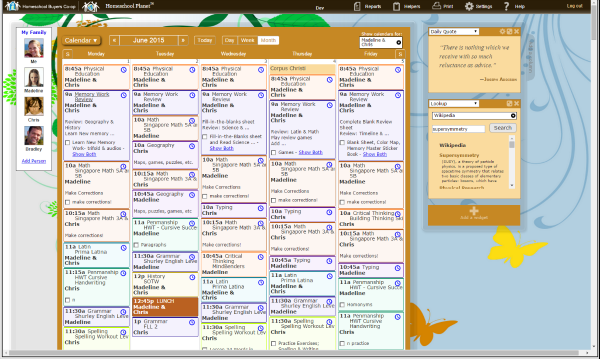
Create (and sync) a calendar for everyone, view, share, or print the full calendar, individual calendars, or individual portions of any and/or all calendars. 
Each individual's calendar can have their daily homeschool assignments, chores, church activities, medical appointments, etc... pretty much ANYTHING that needs to be scheduled CAN be scheduled here. 
Calendar View
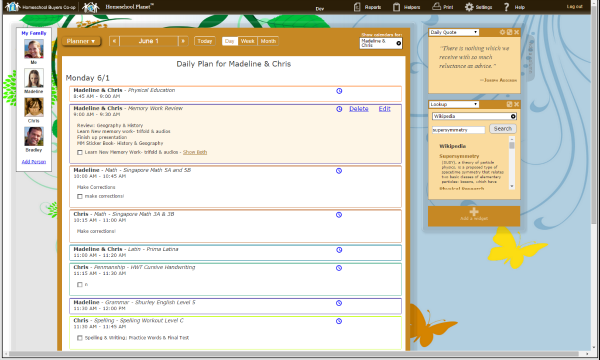
If that's too much for you to look at all at once, you can use the "Planner View" which shows what needs to be done in a more simplified list format. Super flexible (And for some people like me, a little overwhelming with all of the possibilities)! 

Each student is given their own log-in so that they can access their assignments and check them off when they are done. Great idea! Accountability!

Each family member with entries on the calendar is sent a daily digest with their schedule, assignments, and chores so they know what's going on that day. If your family is really techie, you can also schedule in reminders for events or assignments to be delivered via text message or email to any family member (we're not quite that techie here just yet...) 

By now it should be apparent that this is a much different animal than the calendar that came on your computer, whichever model you have (PC/MAC). 

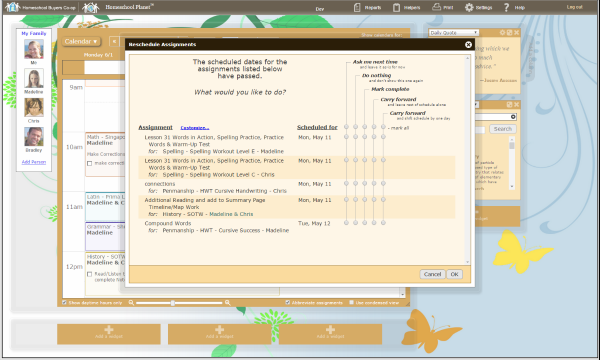
One of the main differences comes in with the homeschool assignment scheduling~ You can enter in detailed daily assignments, including web links and notes, if you need something more than chapter and page. When life happens and you don't get to an assignment one day you can reschedule the assignment. 

Here's a screenshot of the Homeschool Planet Planner open to the "Rescheduling Helper" on a sample calendar. 

And here is a screenshot of the rescheduling tool in detail so you can see all of the options you have for moving things around. 


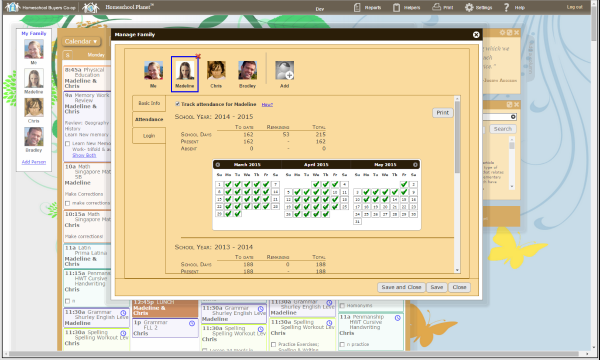
Attendance Chart for each Profile
For states where attendance is required, the Homeschool Planet Planner includes an attendance chart for each student... and a transcript form that I would suggest is filled out at the end of each high school year, to help streamline the transcript process.  You can also set up grading categories and scales for each class, allowing you to enter grades for each assignment, if you choose to use grades. *Note: when your student reaches high school you may want to consider some sort of grading scale for use in calculating grades/GPA on their transcript.

Create a Transcript


Beyond the homeschool planning aspects, the planner includes widgets that you can add to your dashboard for Shopping Lists (you can create one for each store if you like), To-Do lists for general household/life tasks, Daily Quotes, Daily Bible verses, Look Up (you can choose where you want to look, for each type of information; reference, shopping or web search), a Weather Widget, and a Messaging widget.

At this point it should be clear that there is an enormous amount of flexibility with many tools available, and you may wish to take advantage of the 30 day free trial (Or if you're quick, a 3 month free trial... see below) so you can play with the Homeschool Planet Planner and see if it will work well for you.

Some folks are all about the electronics when it comes to planning, and others just need to use a pencil and paper... if you like the ability to utilize all of the features that the electronic offers, but want to have a paper copy, you can print any or all of the assignments, schedules, calendars etc, and have it both ways. Personally I'm more of a paper and pen sort of gal for the most part, but as I have time, I am going to play with this a bit more (When I have a full schedule to put in, vs the summer homeschool light that we have right now), and we shall see how it goes.

You can visit Homeschool Buyers Co-op via Social Media on Facebook, Twitter, and Google+  and I highly recommend watching the 4 minute video on the Homeschool Planet Planner page (linked below) to see a live demonstration on how to use the planner. Sometimes seeing it in action is the best way to see what is offered.

Not So Nutty Nitty Gritty 
  • Company: Homeschool Buyers Co-op
  • Product: Homeschool Planet Planner (Link to 30 day free trial, no credit card required)
    • If you act fast, you can try it for 3 months free, thanks to Homeschool Giveaways , but this offer ends Friday, July 17 at 11:59pm EST
    • If you use either of the free trials and decide to purchase, all of your information will transfer over! 
  • Ages: For Mom/Dad to organize all ages! :) 
  • Price: $65/year or $6.95/month
Please click the banner below to visit the TOS Review Crew and see what others had to say. As always, I hope that this review was useful to you as you choose where best to spend your homeschool budget.
Blessings~


Click to read Crew Reviews
Crew Disclaimer

Thursday, July 9, 2015

Logical Handwriting course? CursiveLogic Workbook

One of my least favorite "subjects" in grade school was penmanship~ Because mine was never great, and almost always received an average grade of "C." As a result, I never pushed penmanship on my older two children, particularly when they were younger, and as long as I could read their work (which was sometimes a mix of manuscript and cursive). However, as time goes by, and they have needed to know how to write in cursive for at least some specific uses (like signing their name...), I have determined that they need to improve on what I have allowed. Very handy that CursiveLogic offered the CursiveLogic Workbook for review, just in time for my 14 year old to work on his handwriting. 

Yes, I know, I'm a little bit of an odd duck with my penmanship baggage, so I was pleased to see this workbook, which is fairly no-frills from a "cute" point of view, which is important when improving a teen boy's handwriting. It is also reasonably simple, so easy to use with a younger writer as well! 

The workbook is a combined teacher/student manual, with instructions and direction (Making it great for a self-directed teen). The first portion gives direction on preparing to write cursive (Grip, posture, etc...) that may very possibly be familiar. The rest of the beginning instructions discuss the philosophy and methods used by CursiveLogic. 


Two key features to the CursiveLogic method  


1.The letters are grouped by shape: Four basic shapes make up the entire alphabet. CursiveLogic teaches all of the similar letters in one lesson, greatly simplifying the learning process. This allows the student to reinforce the strokes that they have learned with each letter in the lesson. 

2.  Letter strings: Rather than teaching letters individually, CursiveLogic teaches all of the letters that share a common shape in a connected string. This allows the letters to reinforce each other and means students are writing in cursive from the very beginning.

Visual learners will find Color coding useful: Each letter string has a theme color that helps students remember the shape. The upper case letters are also grouped according to shape and stroke. 

And Auditory learners will benefit from the Catch phrases: CursiveLogic uses “verbal task analysis,” or saying an action verbally as it is performed manually, to aid the development of muscle memory and to give students a mnemonic they can return to over and over.

• Real words: Because CursiveLogic teaches a group of letters in a single lesson, students can write real words at the end of the first lesson. 
For some students, this immediate success is a huge motivator.

While my son, being older, didn't require the "hands-on" instruction, or the immediate success of writing 3-4 letter words, it was still very useful for him to have the tracing practice and the writing practice for each set of letters. 

The thought of writing his signature is no longer a terrifying thought, and if I can just get him to keep his writing to a scale that is readable (aka NOT ant-sized...), then this will have been a successful venture into the world of cursive. 

Oh, one more thing that is pretty nifty~ for practice purposes, there are some dry erase-ready pages at the back of the book for practice purposes, which may be VERY useful to the younger crowd. 

CursiveLogic is also making available to TOS Review Crew readers some free practice pages using Psalms and Government quotes. Check them out! :) Of course, they will work best after having learned all of the letters in logical order, via the CursiveLogic Workbook. 

Not So Nutty Nitty Gritty 
You can visit CursiveLogic Social Media sites: Twitter, Facebook, and Instagram

Please click the banner below to visit the TOS Review Crew and see what others had to say. As always, I hope that this review was useful to you as you choose where best to spend your homeschool budget.
Blessings~


Click to read Crew Reviews
Crew Disclaimer

Thursday, June 25, 2015

SmartKidz Media ~ educational videos, flash animated content, and more

Sometimes it seems my youngest child may be a little bit too fond of "screen-time," and the funny thing is that it doesn't seem to matter *what* screen he's watching/ playing with, he just wants to watch. :/ However, it is also useful to have some media available to help keep him constructively occupied when I need to leave him with one of his siblings (while driving the other to practice or something like that) ~ allowing the older sib to have the quiet they need to get their work done.  A little bit of a balancing act in allowing some, but not too much! It also takes a while to sift through the typical venues to find media fitting that profile, which can be somewhat time-consuming. That being said, I was very interested to check out my latest review, the SmartKidz Media Library for Homeschoolers by SmartKidz Media.

SmartKidz Media offers hundreds of educational videos covering a wide variety of topics~ Animals, Nature, Music, Art, Cooking, Travel/Foreign Countries, History, and more (There are even Pilates videos!)

In the screen shot above, the drop down menu you see is from the World Of Discovery tab, and shows the categories of videos available there, which some of the "covers" shown. My family was most interested in the Nature/Animal videos, and some of the travel and cooking videos, so those are the ones we checked out.

We also took a peek at the Mighty E-Book Collection Tab and the My Animal Family Tab

The Mighty E-Book Collection is a section that my almost 8 year old will be allowed to browse more or less on his own. We enjoyed the animated, narrated ebook of "Mice-tro Mozart, the Opera House Mouse" and there are a number of Aesop's fables to be found here, that I want to check out. I appreciate that this collection has some specific age guidelines.

My Animal Family Tab is a section that offers exactly what I was expecting from SmartKidz Media. Educational videos, clearly narrated and very appropriate for family viewing (The story songs weren't our cup of tea, but they might suit a younger child, or special needs learner).

Some parts/things we liked more than others~

All of the videos we watched were well done from a cinematic point of view~ Note: if you have a slower computer or a slower connection you might find that the streaming doesn't stream very well. We had some trouble with the videos on our laptops (Which are older), but were able to view them easily on an iPad 1 and an iPhone 6, so definitely a hardware issue on our end~ if we had a newer TV or newer Roku, it would have been a piece of cake, as the videos can be accessed from those readily.

The narration of the videos was a little choppy at times, as if the narrator was reading from a script, so inflections were sometimes a little odd, but that's not a major issue. In the "Travel" and cooking videos the narrator was also sometimes the translator, and it occasionally seemed as if perhaps the wrong words were chosen (For an American audience, at least~ there are some differences between British/Aussie English and American English...), which made it a little confusing~ not really a like/dislike issue, just more of a heads-up commentary.

We found that some scenes jumped from one right into another without taking a breath, as it were, which can make it difficult to process what is being seen/heard.

Content:
I would like to see age recommendations for *each* video, as well as more "chapters" within those that cover multiple topics (Animals, travel, etc...).

I say this because there are some videos that include content that may not be appropriate for all ages~ it would be nice to be able to skip those sections, and continue through the rest of the video, that is "all-age-appropriate." I appreciated that the cooking videos had "Chapters, and thought something similar could be done with most of the others.

As with all media, different families have different standards, so I would suggest pre-watching most videos if you have a younger/elementary-aged child.  Smartkidz Media offers a 14 day free trial that will let you check the video and reading/learning selections yourself!

There are other tabs that we didn't check out because they didn't fit our family at this time, but might fit yours: Baby Signs, Special Needs, Ready Set Sing, and Living Skills Songs. I glanced at the Quick Find Study Guides, and they appear to be something of an electronic index card box~ with basic helpful information at your fingertips~ Rules, Definitions, and Examples for Language Arts, Math, Social Studies Basic study guides, and Science introductions and definitions.

Not So Nutty Nitty Gritty 
You can visit SmartKidz Media on Facebook, and Twitter.
Please click the banner below to visit the TOS Review Crew and see what others had to say. As always, I hope that this review was useful to you as you choose where best to spend your homeschool budget.
Blessings~



Click to read Crew Reviews
Crew Disclaimer

Thursday, June 18, 2015

CTC Math ~ the online math tutor with a lovely Aussie accent


In April 2014 I wrote a review for the CTC Math  12 Month Family Plan. Once again we were fortunate enough to receive a membership for review, and I was curious to see if there had been any changes to the program.

In case you don't have time to check out my previous review, I'll try to give a quick synopsis here. CTC Math offers a full online curriculum for grades K-6, and supplementary work/practice for those levels above 6th grade, all the way to 12th grade. (You can access a complete lesson list )

The basic format is online whiteboard lessons narrated by a male with a very pleasant and cheerful Aussie accent. The student can stop, rewind, replay, or fast forward (not recommended) through the lessons as necessary, in order to get the concept down.

After the video lesson there are questions to be answered, with built in progress reports and reward certificates based on proficiency. The progress reports are one area that has changed since we reviewed last year. Now it isn't necessary to complete each lesson three times in order to earn a certificate, certificates can be earned with high percentages the first time around. Hurrah! That got rid of some of the busy-work that my 2nd grader didn't enjoy (or need) last year, when he was motivated to earn those certificates.

You can see in some topics he completed the questions more than once, but others he was done with the first time around. You can also see that every section doesn't have to be completed at the same time~ in the money section he completed a lesson last year when he was working on first grade materials, but this addressed a topic that we were going over independent of his CTC lessons~  handy to know that your child can move up or down as it suits them, and all the work they do shows up in the reports!

This time around I had a little more time to check out the iPad option, and there are some things that I really like about that option. Oddly enough one of them is the reports page. Above is the detailed report. Below are a couple of sections that show his awards and progress:
The first is the one from the iPad:


 And these are from the computer interface:


I really like the look of the ones from the iPad! Nice upgrade, CTC!

Some things that haven't changed that I'd like to see~

There is still not much recognition for completing the diagnostic tests (I'd like to see certificates awarded for those... at least for the K-4th grade crowd).

The need to print out worksheets for the older students: My son still finds it clunky to print the worksheets, do the work, and then enter the answers on the computer. It would be nice to have an interactive workspace for the higher maths to do the work right there, somehow. However, this may not be realistic... pencil and paper may just be necessary for Algebra and beyond.

FINAL THOUGHTS
I do recommend checking out CTC Math to see their demo video and sample lesson, as well as checking out my first review which had a few more screen shots of the actual program. Then, I would suggest signing up for their free trial to test drive before you purchase (I love programs that offer that option!).

CTC Math is set up well for many learning styles~ the audio (narration) and the visual (whiteboard). For the younger children, certainly, there are also kinesthetic activities~ interactive dragging items to do the math. I am still very impressed with CTC Math, and think it could be a good fit for a variety of learning styles. For those who have larger families, it is also one of the most homeschool-friendly companies, with a generous discount and one price for 2-10 students.

Social Media: You can find CTC Math on Facebook

Not So Nutty Nitty Gritty 
  • Company: CTC Math
  • Product: 12 Month Family Plan
  • Ages: Kindergarten to Calculus
  • Price: Special homeschool prices ~ 60% off the regular price (access by clicking through the product link above).
    • $11.97 Single student 1 month (Recurring payment)
    • $50.80 Single student for 6 months
    • $78.80 Single student for 1 year
    • $15.97 Family plan (2 or more students) 1 month (Recurring payment)
    • $78.80 Family plan (2 or more students) for 6 months
    • $118.80 Family plan (2 or more students) for 1 year
Please click the banner below to visit the TOS Review Crew and see what others had to say. As always, I hope that this review was useful to you as you choose where best to spend your homeschool budget.
Blessings~


Click to read Crew Reviews
Crew Disclaimer

Friday, June 12, 2015

Institute for Excellence in Writing (IEW), Deluxe Combo Teacher/Student Writing Package Level C and MORE!

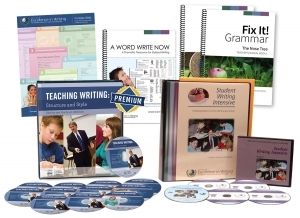
Fair warning to you~ this may be a slightly more lengthy review than usual, which would only be in keeping with the quantity/quality of the material being reviewed. Institute for Excellence in Writing (IEW) sent me the Deluxe Combo Teacher/Student Writing Package Level C (Fix-It! 1 and 2),   A Word Write Now and the Portable Walls. What a HUGE set of material!


*Note: other crew members received a variety of levels, and/or other products, including some special needs packages which include the Bible Heros Student and Teacher books, and the Primary Arts of Learning Reading and Writing Packages. Please be sure to follow the link at the end of my review if you are interested in any of these products, to see what they thought of them. I have not see the Bible Heros books, but I wrote a (non-special needs/non-remedial)  Primary Arts of Learning Review in 2012, and back in 2011 I wrote a fairly comprehensive Level B Teaching With Structure and Style/Student Writing Intensive Review, which is the only reason that this review isn't insanely long~ I'm hoping that you'll check out what I had to say back then, because much of it still holds true!

The Student Writing Intensive (SWI) Level C appears to cover much of the same basic instruction as Level B, but uses some different literary pieces, geared towards the student's age and maturity level. For instance, when we reviewed level B, one of the first stories was more of a  Jr. High novel science type of story that my daughter remembers to this day (smile). The same lesson in Level C used material about Thomas Jefferson, and another piece about the development of standard time zones.

Looking ahead, Level C also goes on to tackle various styles of essays, which is most appropriate and useful for the high school student.

The core of this material is made up of the Student DVD's and the Student Notebook with Handouts and Lesson Plans. Watch the Video Lesson, do the work on the handouts, following the lesson plans, hand it in to mom~ pretty simple to follow!

What exactly does SWI do? Rather than rewriting my thoughts, I'll quote from my first review:
The units move at a fairly steady pace and build writing skills, focusing on just a few techniques and structural elements at a time. I should mention here that if your student has an extremely creative literary bent and is ALWAYS writing, this program might feel a little stifling.  However, Andrew Pudewa has taken pity on the poor souls who never know what to write about, and has given them specific excerpts to re-write. The basic concept is that it is too hard for many children (And adults) to concentrate on learning how to write AND come up with their own content at the same time. I think that depending on your student, and possibly allowing them to choose their own topics, even prolific stream-of-consciousness writers can gain some insight on how to "dress up" and improve their writing.
It's much easier to solidify one's voice or style once one understands the structure of good writing.

My Middlest has expressed a desire to continue with this course through his next school year, as he enjoys the video classes, and the scheduled assignments. Not much higher praise than a student AND the parent/teacher wanting to continue with a specific curriculum.

After 15 years, the Teaching Writing with Structure and Style (TWSS) seminar has been updated! Please do go visit my previous review, because much of the innate program remains the same, but now there is MORE material, and the workbook has a streamlined, updated look.

Here is a chart detailing the differences between the 2000 and 2015 editions:


IEW has put together a pdf detailing more of what's new, with highlights of Workbook updates, the new Premium Subscription, and the Streaming Video Subscription, which helps to keep up with these more techno-mobile times. Great for families who school on the go!


Fix-It! Grammar has a very Charlotte Mason-ish feel to it. By this I mean that the lessons are very short~ 33 lessons meant to be completed in 15 minutes (or less) in 4 exercises per week. Who doesn't like that? When chosen for this review we requested books 1 and 2 just because my Middlest was a little rusty with some of his grammar. After a few lessons, he felt that these would be great books to zip through in the summer (moving a little more quickly than one exercise/day~ perhaps a full lesson/day), as a refresher course before the new school year. IEW suggests that the high school student could go through one book per semester if they doubled up on the exercises. Fix it Grammar makes an excellent elementary, remedial, or refresher course.

The lessons start simply, and focus on learning the notation or proper use of one or two new things each week. For example, the first week covers nouns, end punctuation marks, and the [there, their, they're] homophones. The next week covers articles, but all of the previous notations must still be used, and so on. This is one instance where one can see how the cumulative effect works.

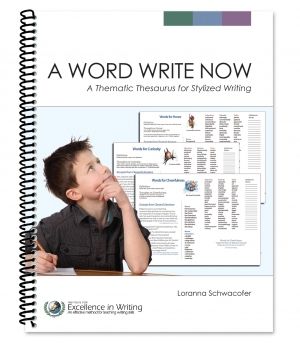
A Word Write Now is a thematic thesaurus for the writer~ a quick reference for some of the more common topics that might come up in a student's daily writing: Character Traits, Words to Describe, Words for Movement and Senses, and an Appendix with more information. Middlest hasn't needed to use it much yet, but he knows where to turn when he is searching for a more interesting word choice.

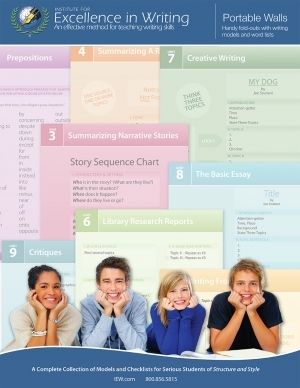
The Portable Walls is a great tri-fold quick reference folder that lives in Middlest's IEW Binder. If one had a distractible student, it would be very useful as a "study corral" to help them keep distractions at a minimum, while having useful material nearby, but Middlest mostly has it at hand so he can pull it out if he needs a specific word, or to reference the topic of a specific unit.

If these resources intrigue you, I highly recommend visiting IEW on the world-wide web. They have a vast amount of information to share with you, and help you on your journey to helping your children become Excellent Writers!
IEW can be found on
Not So Nutty Nitty Gritty 
Please click the banner below to visit the TOS Review Crew and see what others had to say. As always, I hope that this review was useful to you as you choose where best to spend your homeschool budget.
Blessings~


Click to read Crew Reviews
Crew Disclaimer

Followers

LinkWithin

Related Posts with Thumbnails