Thursday, November 3, 2016

J. Warner Wallace and Susie Wallace’s ‘Cold-Case Christianity for Kids’Blog Tour and Giveaway (ends 11/4)

My Youngest (who at the moment hopes to become a police officer when he grows up), is very excited about a book we received in the mail a short while ago from Litfuse Publicity and David C. Cook Publishing. .Cold-Case Christianity for Kid is a kids' Christian Apologetics course wrapped up in detective clothing, proving the case for Christ. 

Screenshot from "Online Academy" 
J Warner Wallace is a real-life cold-case homicide detective who has been featured on Dateline, Fox News, Court TV and other crime related TV shows. He was an atheist until well into his 30's, but when he examined the evidence (using the tools of his trade), he discovered  it pointed to an understanding that Christianity is "demonstrably true," and he turned his life over to Christ in 1996. Since then he has earned a masters in Theology, and serves as an adjunct professor at Biola University, and a faculty member at Summit Ministries, while still consulting on cold-case investigations.

Written for the 8-12 year old crowd, J Warner and his wife Susie Wallace have created an apologetics course through story, with CSI assignments, video messages from J. Warner, and printable activity and Cadet Notes sheets to print as well as an adult leader discussion guide. Their book is engaging and will spark the interest of any child who loves a good mystery and wants to know how to solve one. They will also pick up the tools needed to demonstrate the truth of the Word.

My son was hooked immediately by the premise, and although he moans and groans occasionally about filling out worksheets in his school work, he has been anxious to complete those that go along with this book! This photo was snapped without his knowledge, while he was actively engaged in the case.

Some words from the publisher:
At the crucial age between 8 and 12, many kids begin to wonder if Christianity and the Bible are true. Help your kids become truth-seeking detectives with the help of J. Warner and Susie Wallace's Cold-Case Christianity for Kids. Detective Wallace gets kids excited about testing witnesses, examining the evidence, and investigating the case for Christianity. The book includes author illustrations and links to a website where kids can download activities, fill in case notes, and earn a certificate of merit.

Encourage your kids to investigate the case for Christianity by entering to win a faith examination kit and a copy of J. Warner and Susie's new book.

cold-case-christianity-400 

One grand prize winner will receive:
Enter today by clicking the icon below, but hurry! The giveaway ends on November 4. The winner will be announced November 7 on the Litfuse blog.


cold-case-christianity-enterbanner

Blessings~

Wednesday, November 2, 2016

Accountable2You: Group Plan (Review)


The TOS Homeschool Review Crew were recently asked to review a number of plans from Accountable2You, a computer and electronic device monitoring company. Options available were Individual Plan, Family Plan, Group Plan, and they also have a Small Business Plan. I was chosen to review the Group Plan as I am a local homeschool support group leader with about 50 families in our group.

As of this moment I haven't gotten anyone else to sign up with the plan (mostly due to busy schedules, and no opportune times to have a group discussion), however, I will discuss what it looks like on the administrative side, and also how we can use it in our own family.


As a Group Administrator, you set up the Group account, and from there you can set up your own own user account for your family, and send invitations to those in your group. Each member of the group receives the equivalent of an Individual account. The Group Administrator doesn't receive or access any of the Individual account reports, so each family's privacy is maintained.

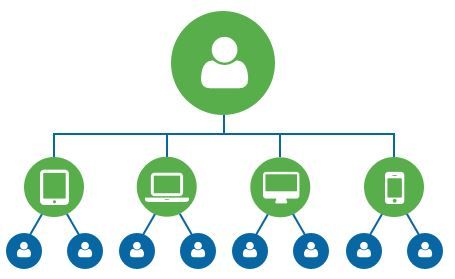
Once a user account is created it is time to add devices. Each user account can add up to six devices, which can include desktop and laptop computers, tablets, and phones. A list of supported devices may be helpful as you determine which ones are the most important to set up. FYI, Android devices receive the greatest amount of monitoring.

Setting up each device
Each device must be set up separately (downloading the software), and can then be customized to that particular person's usage (the User can use their own computer to finish setting up the specific parameters for each device). Add accountability partners (unlimited for each device), and specify activity notifications. Choose to have reports sent daily, weekly, or instantly via text if you are monitoring a serious concern.

Setting Activity Notifications
For some families, there may be specific activities and communications that they would like to have monitored that can be summed up in a few different words. For this you can set those words as "objectionable words" and have them highlighted in the reports, or sent immediately via text. In our household, I am most interested in using this to monitor the amount of time spent on non-school-related activities, especially during school hours. For that purpose, I have input "Fishing" and "Gaming" as "objectionable words" simply so that I can tell when/how often my Middlest is not concentrating on his schoolwork when he is in another room. ;) Obviously, other families may have more serious concerns, and this could be an extremely helpful tool for them.

Reports
I was astonished the first time I received a report. I had set up the software on my son's phone (which isn't activated, but used like a tablet on wifi). There were over 400 notifications (all good "green" activity)! It records every tap and swipe of the finger. So some notifications were simply "Log in" or "Log out" others had to do with an app crashing and so on. If there was a chat message sent, it showed up. You can also search specific words inside the report. Turns out "fishing" only showed up when he logged into his email(part of his address), so that word can probably be removed...

I am thankful and blessed that the only major worry *I* have with my teen son is how much time he spends online doing non-productive things. I don't have to worry about them being "objectionable" activities. If anything should happen to show up in the report that was truly objectionable, just knowing about it would open up the doors of communication so we could talk about it, and try to safeguard against future problems. Peace of mind is a good thing. ;)


There are a few differences in the different plans. The Family Plan is probably one of the most useful for homeschooling families, as it allows the parent to set up specific "child accounts" and also set up time limits. It doesn't actually turn the device off, but sends an alert to the parent to let them know the device is being used during "off" hours. I think this is a great option, because it helps build integrity... not "I'm going to prevent you from doing wrong" but "I'm going to know if you do wrong." There's a big difference in those two, as the second teaches the child that they are responsible for their actions.


Not So Nutty Nitty Gritty 
You can visit Accountable2You on their social media pages: 

Please click the banner below to visit the TOS Homeschool Review Crew and see what others had to say. As always, I hope that this review was useful to you as you choose where best to spend your homeschool budget.
Blessings~
Click to read Crew Reviews
Crew Disclaimer

Friday, October 28, 2016

CrossTimber Name Meaning Gifts (Review)


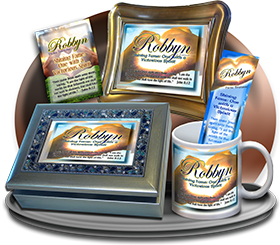
I always enjoy it when the TOS Homeschool Review Crew gets to review something out of the ordinary, especially when it is a homeschooling family's business! CrossTimber is the family business of John and Katie Dehnart and their children. They offer name meaning gifts in a variety of formats: Personalized Framed Plaque with Name Meaning and Bible Verse in 7x9 and 8x10 sizes, Name Meaning Mugs, and Music boxes. They also offer special discounts and bookmarks with multi-item orders.

So, now that you know what they offer, let me tell you a little bit about our experience. One of the first things that you will want to do is find out what they will be using for a name meaning. Although I already knew the "traditional" meanings of the names in my family, I wanted to know what they would come up with. Over the course of discussion with John I found out that they do indeed pull from many resources to put together their name meanings... a bookshelf full of babyname books, linguistic translations for some names, Bible dictionaries for others, and for most names, prayer. A family after my own heart, researching the details.


So, the toughest part for me was choosing which family member to make a plaque for. I finally settled on a plaque for my husband, as he had nothing similar, and the name meaning the Denharts used truly does reflect his heart and personality.

Name Meaning Plaque

One of the additions that make CrossTimber's name meaning plaques unique is that they also incorporate a Scripture verse that coordinates with the name. I especially love that the verse chosen incorporates music and singing for my musician husband~ and that's where the prayer on the part of the Dehnarts comes in, as I didn't mention anything about that at all!
Name Meaning Plaque with complimentary bookmark close up detail
The ordering process was fairly simple once I made up my mind on whose name to use, and which background to choose. Oh yes... the backgrounds~ There are SO MANY beautiful backgrounds, photos and designs... If you are ordering for a special occasion, make sure you allow enough time to make your choice~ It took me a few days to decide!
There are many designs for each of these categories:

Although I was quite happy with the name meaning and Scripture chosen for the plaque I ordered, I am fairly confident that the Dehnarts will work with you if you have a specific meaning or verse you would like to use. In fact, they have a personalization option that allows for something other than a Bible Verse to be included on the plaque if you are ordering for a special occasion. 


Not So Nutty Nitty Gritty 
  • Company: CrossTimber
  • Product: Personalized Framed Plaque with Name Meaning and Bible Verse
  • Ages: Gift product for all ages
  • Price: $25 and up
Visit their social media pages on Facebook and Pinterest. Be sure to enter their drawing for a free gift (choice of 2 name plaques or a mug) before it ends (don't worry, you have a month left yet..., just don't forget! :D ).

Please click the banner below to visit the TOS Review Crew and see what others had to say. I took a peek at a few of the reviews, and Wow! There are some really amazing pieces out there! As always, I hope that this review was useful to you as you choose where best to spend your homeschool budget.
Blessings~
Click to read Crew Reviews
Crew Disclaimer

Thursday, October 27, 2016

Middlebury Interactive Languages~ High School German (Review)


We were fortunate this fall to receive the offer to re-review  High School German I  for Middlebury Interactive Languages. You may recall that I reviewed it last fall, but due to various constraints we were not able to continue it for the 2nd semester, so my son was not able to receive a full language credit for the course. With a second chance to check it out, I am hopeful that he will be able to complete the full course so that I can give him credit this time around. :)

As a refresher, the course *is* interactive, and hits a number of learning styles, with exercises in listening to native speakers, recording auditory answers, and watching videos. Not entirely immersive, but close. Each unit has a similar layout in that they introduce new vocabulary, grammar patterns, culture videos, speaking and writing activities, reading and listening activities. The units have a variety of interactive exercises to help reinforce the vocabulary and grammar concepts.  There are also pop quizzes and tests which are automatically graded.

Here is a look at the first semester objectives. you can see the pop out where I clicked on Unit 3 to show what would be learned that week:

The lessons are accessed a couple of ways.
Via a calendar (which still doesn't have the ability to be adjusted to accommodate personal homeschool schedules, as we weren't able to access the program until after the lessons had "started" on the calendar, so started out "behind." I'd also like the ability to move lessons over a day to account for field trips and holidays ~ homeschool teacher access to the calendar is still on my wishlist,)

You see that you can click on the calendar date, from there click on the Unit Lesson, and the list with checkboxes and lesson slides show up. If the lesson hasn't been done, the student simply clicks on the slide and it begins. The green checkmarks are for the activities that have been completed.
The other way that the lessons can be accessed is through the table of contents. Here you can see the "Tips to Become a Successful Online Learner" slide from the introduction. As with the calendar view,  the checkmarks on the left of the screen show which activities have been completed. The bold letters show the current slide. You can also see that I randomly clicked on Lesson 2 to open up the menu and check to see which activities were done.


If you want to check on the student grade, you also have that option, via the dashboard:

If you click on the "grade-book" link on the left hand side it opens up a list of the quizzes and tests that have been taken with their grades. You can then click on the "Grade Report" button on the left side to see the student grade average. 


So far my son is still reviewing the lessons he went through last fall, but he definitely has a better handle on the language at this point, and it shows up in daily conversation, which is fun. He enjoys the breadth of the activities, and the fact that they aren't all exactly the same.

I think this is a great way to learn a language, and with a few little tweaks (ie: calendar access for the homeschool teacher), I think it would be fantastic!

The Elementary and Middle School courses look like they would be great also. It is worth noting that they suggest going straight to High School German II if the student has completed Middle School II.
  

Not So Nutty Nitty Gritty 
Please click the banner below to visit the TOS Review Crew and see what others had to say. As always, I hope that this review was useful to you as you choose where best to spend your homeschool budget.
Blessings~
Click to read Crew Reviews
Crew Disclaimer

Monday, October 24, 2016

Educeri Lesson Subscription Service (Review)


Members of the TOS Homeschool Review Crew were recently given access to over 1000 lessons (with options for K-12 learning), via  Educeri .......  Educeri a division of DataWORKS  and their  Educeri Lesson Subscription Service.

This is a fairly unique product, in that the powerpoint style lessons aren't really written directly to the student, but prepared for the teacher to use. Obviously this is well suited for a classroom scenario, but it can be used in the homeschool as well.

There are hundreds of lessons in math and language arts, which means multiple lessons for most grades. The science lessons are more for middle/high school, and there is currently just a smattering of art, music, and even a couple for PE. What this means is that this could be a good resource for someone who is running into problems with a particular subject, and would like to see it from another approach. OR it could be used to rabbit trail, following the interests of the child.

Many lessons are correlated with common core (helpful if you live in a highly regulated state that would like to see those correlations), and others are not. Because I'm not overly fond of common core, I mostly to look at other lessons, particularly when it comes to math. ;) Here is a screenshot of a lesson I decided to use with my 4th grader, to help him check his multiplication and division answers:


The slide starts with nothing where the red numbers and text are. As you talk about the problem and walk through step-by-step (by clicking the right arrow at the bottom), the words or numbers in red show up in order. If you want to emphasize something you can use the pen or highlighter to show that. In this slide I circled a few things and drew lines and symbols to help explain what was going on. That's a pretty nice little feature! :) 

Some (but certainly not ALL) of the lessons also include printable student handouts for practice.

One of the other features of the site is the searching ability. If you aren't able to find a lesson that coordinates with what you are looking for, you can send a request for that lesson.  I filled out a request for a lesson multiplying double digit numbers by double digit numbers (copying the style of another lesson title), and although I wasn't able to locate it myself, I received a reply email with a link to the lesson I was searching for. My understanding is that if the lesson doesn't exist, your request will likely go onto a list of possible future lessons.

I am looking forward to using some of the language arts lessons when we get to metaphors and similes. The history lessons look like they are mostly for middle and upper grades. I find it interesting that they include lessons on the origins of the major religions (Buddhism, Christianity, Confusionism, Hinduism, Islam, and Judaism) as well as lessons on various cultures and the causes of specific wars.
  

One little rabbit trail that we took included a lesson that was a little over my 9 year old's head: "Trace the Principles of Democracy in Historical documents." We checked that one out because we were talking about Fort Knox, and had learned that there was a copy of the Magna Carta which sparked the question "What's that?" Have to love a lifestyle of learning!

Not So Nutty Nitty Gritty 
Please click the banner below to visit the TOS Homeschool Review Crew and see what others had to say. As always, I hope that this review was useful to you as you choose where best to spend your homeschool budget.
Blessings~
Click to read Crew Reviews
Crew Disclaimer

Wednesday, October 19, 2016

Learning to Read and Write Beautifully (Review)

In addition to the Handbook for Writers review that I posted last week, members of the TOS Homeschool Review Crew also received digital copies of Perfect Reading, Beautiful Handwriting published by Everyday Education, LLC, and I was given the opportunity to take a brief look at the manual.

The foreward and introduction include suggestions on teaching and scheduling the lessons, as well as some of the different ways the book can be used (From the beginning reading/writing child to the adult who wants to improve or change their handwriting). The scheduling section utilizes short Charlotte Mason inspired segments, which can help eliminate some of the tedium that many feel when learning to write, and avoid tired, cramped hands for small children who are still learning how to use a writing instrument. 

I don't have a beginning reader, but I took a brief look at the reading instruction. For the most part it looks very simple and basic, which is good. The basic method used is to teach/read words in the same family, followed by silly sentences that incorporate the words practiced.
Here is an example of one of the silly sentence pages... 
I did run into a few issues with pronunciation, although they aren't major. I have the feeling that the author may have grown up in a different part of the country, based on some of the sounds for some of the words given. For instance, I was taught (and my dictionary backs my instruction up), that 'care' is pronounced ke(ə)r not kār, so that is an unfortunate example, and I would say that pair, fair, and stair all follow the same e(ə)r sound pattern.


While there may be a few different regional pronunciations that may be coming through in this manual, given that the author's specialty is handwriting, this isn't a huge deal, just something to look out for. 

I also perused the handwriting portion, which was of the most interest to me specifically, as handwriting is always an issue in our home. The manual uses actual handwriting for the examples and not a computer generated font, which makes it easier to copy. There is an informative discussion about the history of italics and styles of writing. After the basics are learned (in the second chapter), the handwriting section covers joining letters, and ornamentation, as well as instruction in using an edged or calligraphy pen.   

I have finally come to terms with my own handwriting, but thought I would give the italics a whirl myself, and this is what I came up with after a few days' practice: 


The reproducible practice sheets throughout the book are useful, and the practice sheets at the end of the book include guides for correct angling of a calligraphy pen, which is often one of the most difficult things to master. Perfect Reading, Beautiful Handwriting is something that I may look at further for my own use (Working on "beautiful" handwriting, with flourishes and joins) and also for that of my youngest child, as we begin to address his handwriting sometime in the future. 

Not So Nutty Nitty Gritty 
You can visit Everyday Education, LLC on Twitter

Please click the banner below to visit the TOS Review Crew and see what others had to say. As always, I hope that this review was useful to you as you choose where best to spend your homeschool budget.
Blessings~
Click to read Crew Reviews
Crew Disclaimer

Followers

LinkWithin

Related Posts with Thumbnails