Well, this post just doesn't want to be cooperative! It was supposed to publish on Friday, but didn't. The good news is that means that there are a few more things for me to share with you.
NEW RELEASE TODAY
If you HURRY over to New Release Today , you can still download a song from Citizen Way's new album 2.0, On My Side. I expect it to disappear today, but not sure exactly when.
They also have an Andy Mineo song, Uncomfortable, performed by Jimmy Needham... It is a fantastic cover!
A New-to-me artist, Cody Summer has a song we enjoyed (very reminiscent of Alison Krauss) Way Down the River, from her latest album Canyons and Cathedrals...
Don't forget, you have to sign up as a member (free) in order to download songs for free, but they don't spam...
AMAZON KINDLE BOOKS
A few books for you this week... click on the covers to be taken directly to the book's page. I'm not sure how long the author will have this up for free, but it's a fun (slightly complex) book that combines cartooning with penmanship... Cute!
And here is a neat little book that covers a single colored pencil lesson. It teaches the technique of underdrawing... Not something I ever learned, and definitely not a total beginner lesson.
For the History Buff/ Middle-High School Reader, I thought I would profile Free Kindle versions of a few GA Henty Books. I have reviewed Heirloom Audio Productions' Audio dramas of In Freedom's Cause, With Lee in Virginia, and The Dragon and The Raven. Keep your eyes open for their next production, Beric the Briton. You can check these great stories out for free, by clicking on the covers below, but I do have to say that Heirloom Audio Productions are AMAZING, so if you have audio drama lovers, check my linked reviews above as well... they qualify as Nuggets of Gold for their content, even though they aren't free or reduced prices. ;)
One more fun thing... If you have kids that like Nerf... this looks like a really fun project! I've had this page open in a tab for a while, so I might as well save it here until I get around to making it! :) DIY Spinning Nerf Targets
It's not often that I am given the opportunity to review something produced by one of my friends, but today I get to talk about the Lifetime Membership from my friend Amy Blevins' company, Homeschool Copywork. She has produced a large number of quality copywork ebooks with themes to suit all ages, and many interests.
Amy has created copywork ebooks which feature themes from Scripture, History, Poetry, Art, Science, Music (Composers and Hymns), Nature, and Seasonal Themes. These ebooks are put together with care. They include multiple styles of print and manuscript for handwriting practice and are beautifully illustrated. Some of the pages have great line drawing illustrations which can be colored in when the copywork is finished, and others are accompanied by full color illustrations.
Some of the books are pretty much strictly copywork, others include extra information and/or activities or suggestions that can become a little unit study. Here is a screen shot from one of the Van Gogh books. You can see that the page has a beautiful Van Gogh picture to go along with the quote~ lovely! The beginning of the book includes a biographical snippet and some activity suggestions.
I really appreciate the variety of styles of print/manuscript that she has included, as all of my children are at different places in their handwriting. My Eldest has developed her own style:
My Middlest is still figuring out his style...
And my Youngest is working on letter size and spacing... writing neatly is something that he needs to work on, and these sheets are great, because they give a clear example for him to follow, using sentences that are interesting and/or beneficial.
Because it's a Presidential Election year we chose to use some pages from the Presidential Quotes book. There are quotes from each one of the Presidents, in a variety of styles.
My eldest was delighted to discover verses that included two of her favorite things, Dragons AND Owls in the Dragons of the Bible book (Among other Dragon references...)
My youngest was also interested in The Armor of God book... Anything having to do with "army" or "armor" makes him happy, even if it isn't Military Police or some other modern force. For my part, I think this is a good way to help to learn the verses from Ephesians 6!
Some of the benefits of using copywork, even into high school include:
Reinforcing proper Spelling, Punctuation, Vocabulary, Sentence Structure, and Grammar ~ as they copy what is correctly modeled they *will* learn.
Memorization aid~ when the eyes see the words, the brain thinks the words, and the hands write the words they are more likely to be retained. This is where quality copywork comes into play. We want our children to be putting meaningful words to paper, into their brains, and hearts. Amy's books definitely set a standard here.
Of course, there is also the benefit of "hopefully" improving penmanship. This is a big thing with my youngest, as his letters are of all shapes, sizes, and smooshed together, so seeing properly spaced and written words directly above his workspace is extremely helpful!
While Amy often shares some samples of her copywork ebooks for free, a membership allows you to pick and choose content from *everything* that she has produced (I believe I counted 47 copywork ebooks), as well as access to Member only Bonus materials, including notebooking and coloring pages.
This is a great resource for all ages. Not So Nutty Nitty Gritty
Please click the banner below to visit the TOS Review Crew and see what others had to say. As always, I hope that this review was useful to you as you choose where best to spend your homeschool budget.
Whether we like it or not, technology is here to stay, and it is becoming a bigger part of our children's lives, earlier than ever. Because of this, it only makes sense to help our children develop not only their reading and writing skills, but also their keyboarding skills. Talking Fingers Inc. offers a variety of programs that are useful in this endeavor, and as part of the TOS Review Crew, we were offered the opportunity to use and review their Read, Write & Type online subscription.
This program is for some of the earliest readers, as it emphasizes phonics and spelling along with reading and keyboarding skills. There is also a fair amount of research that suggests that using Read, Write & Type can be extremely beneficial for Learning Disabled students, including those with dyslexia/dysgraphia as it bypasses one of the major stumbling blocks, a motor/visual process. If you'd like to know more about that, please do read the materials found on their site. This is not an issue we currently have to accommodate in our family, but I know many families that do, so I wanted to be sure to mention it here.
So, what did my 8.5 year old use this program for, if he's already reading like a whiz, and is a fair hand at spelling? Keyboarding skills were the thing for us.
Here is a look of what his skills assessments looked like at one point in the program:
Not too shabby, and nice to see a basic assessment.
Add caption
Talking Fingers was designed by the developer of one of the landmark educational programs, Reader Rabbit. It should come as no surprise then that I would categorize this program as Edutainment. ;) The Intro was a tiny bit "cheesy" for my son, who is on the upper end of the age range, AND a prolific reader, so he wished that he could skip it before going to his next lesson/activity, but he still "Loved" the program, and I never had to ask him more than once to go do his "Talking Fingers" work. I can definitely see that it would be very interesting to the young, emergent reader.
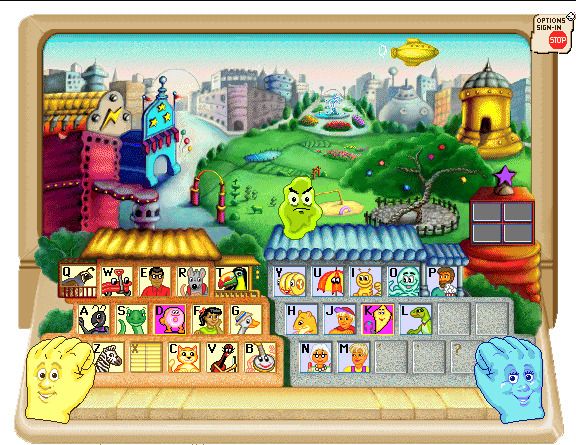
Each letter on the keyboard is the home of a different character (letter), which helps cement "where" they are in your child's brain. Following is a semi-narration from my Youngest about the program:
Most of the time each letter goes into the Movie Theater, where there is a 10(-ish) question quiz, usually identifying the first letter sound of a word (the child types the letter they are learning if it is the correct beginning sound, and a space if it isn't). Once past that, the might go to the Video Store, where you hear middle letter sounds, or to the Circus Stand where there are ending letter sounds.
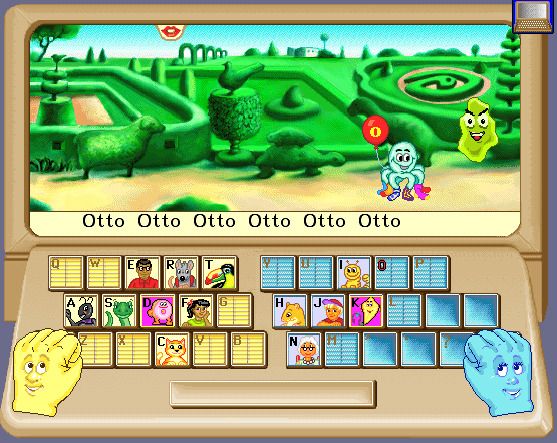
There is a villain in this game, Vex Virus, who tries to kidnap the letters, in order to end stories for all time. The task of the child is to type the correct word(s) in a variety of locations. In the Garden, a word or phrase must be typed repeatedly,
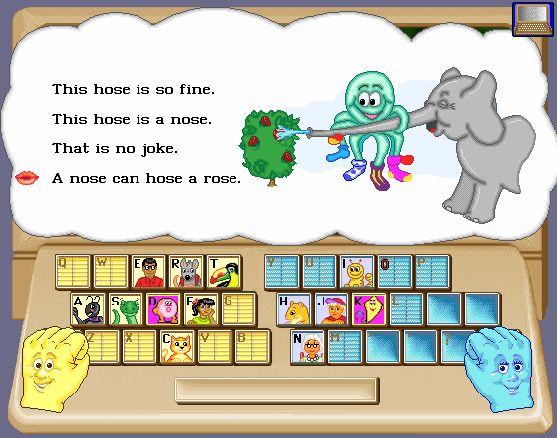
and in the StoryTree, entire sentences must be typed.
There are some locations that the child can choose to visit once they've gotten a few letters under their belt. The Fountain checks their speed and accuracy, The Blimp chooses random letter sounds to review. The Email Tower lets your child write a short story, which they can send to another random user (often from a different country). Then they will send a story back.
This story went from my son to Australia,
and he received this email back from "Zoe, aged 7, Australia"
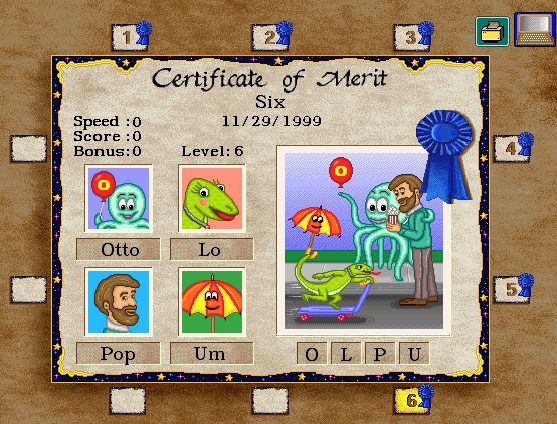
The letters are learned in groups of 4 for each level. At the end of the level, they go to visit Vexor's Spaceship., where there is a longer quiz. When completed, a Certificate of Merit is earned, and stored in the The Hall of Fame. The Certificates of Merit show the speed and score earned for that level.
This is an engaging program that teaches children using a multiplicity of input, Audio, Visual, and Tactile, which all help the brain retain the material more readily, and can be used by all types of learners. Although "some" of the content was "cheesy" to my son, he really has enjoyed using the program, and I expect that he will continue to log on and practice his keyboarding skills throughout the year.
You can visit Talking Fingers Inc's Social Media pages on Facebook, YouTube, and Twitter
Please click the banner below to visit the TOS Review Crew and see what
others had to say. As always, I hope that this review was useful to you
as you choose where best to spend your homeschool budget.
Homeschool families come in a variety of shapes, sizes, and backgrounds, so when graduation time rolls around I appreciate that there are options which allow us to keep that unique flavor of our own family even when presenting our student with something as standard as their high school diploma. I was blessed by the opportunity to review the process of ordering my daughter's Exclusive High School Diploma diploma from HomeschoolDiploma.com , and there are many opportunities to express your families personality when you order.
The first order of business is to determine the size and style of diploma. While HomeschoolDiploma.com does offer the 6"x8" size diploma that was standard in the days of my high school graduation, they also offer the larger 8.5"x11" that has become more popular among her public schooled peers.
There are 5 different styles of diploma offered:
Standard
Personalized
Personalized Gilded
Deluxe
Vintage
As can be expected, the Standard version doesn't offer as many options for customization as the other styles. I'll note as I go through the ordering process which items are NOT included with the Standard Diploma, as we ordered the Deluxe version.
Once you determined the style, it's time to personalize:
*Non-Standard Options
The Center Seal ~ Choose from 4 very different looking seals ~ Christian Education, Soli Deo Gloria, Classical Education, Private Education
Full name of graduate (including gender to make sure of correct wording throughout).
Name and Location of School (And a verification that you have authority to order a diploma as the administrator of your school).
Location "Blued out" above for Privacy purposes, but it looks lovely under there. ;)
*Wording Choices~ This is where the Standard Diploma differs, in that there is only one basic wording offered for Standard, with 2 variations. The other Diplomas offer three more wording options with variations for each, giving you nine different alternatives for personalization.
*Verse or Motto~ Choose one of three standard Scripture verses, or for a nominal fee you can customize the diploma with a different favorite verse or motto.
Date and *Signature Line Titles~ If you have a specific date for graduation you add that here, you can also do what we did, and just use the month and year (when we ordered we weren't sure if my Eldest was taking part in an official graduation ceremony or not...). The Signature Line Titles can be as simple as "Signature" and "Date" or something else that suits your family. HomeschoolDiploma.com offers a number of suggestions to help you make your decision. ;)
Design Details~ Select your paper Ivory or Cream, and the style of lettering. For non-standard diplomas there are also options for Hand Calligraphy instead of the standard Gothic font.
*Honors Seals ~ Gold embossed seals in English or Latin can be affixed for an extra charge.
Diploma Cover~ Many color choices as well as the option to personalize with gold stamped seals/wording. Some of these are standard, others are an extra fee.
Optional add-ons~ An Archive Copy or a Wallet copy may also be ordered with your diploma.
There are other options to add like a gold tassel or 23K gold illumination of capital letters in your school name... you can really go all out if you like!
Other products offered by HomeschoolDiploma.com to complete your graduate's needs and/or to celebrate their achievements include:
Apparel: Cap and Gown sets, Tassels, Honor cords, Stoles, Medallions and Pins. If you are part of an umbrella school you might have a Valedictorian~ honor them! :)
Gifts: Class Rings, Keepsakes, T-Shirts, Photo Frames and Folios
Stationery: Announcements, Invitations, Thank You Notes, and Note Cards, The samples we received (pictured below) meet every expectation of quality that I would expect.
Note: if you are part of a homeschool co-op, HomeschoolDiploma.com offers discounts for package deals! Check it out if you have interest in a group deal!
Please click the banner below to visit the TOS Review Crew and see what
others had to say. As always, I hope that this review was useful to you
as you choose where best to spend your homeschool budget.
My boys have been great fans of stop motion Lego shorts on YouTube, and we've seen some interesting things over the years. Every once in awhile my eldest has also mentioned how fun it would be to try to do something with stopmotion, so when the opportunity came up to review the Stopmotion Explosion Animation Kit by Stopmotion Explosion I jumped right on it! We weren't sure just exactly what we'd end up doing (I was expecting some LEGO Police action from the boys), but whatever we did, *I* was fairly certain that it would be fun AND educational.
This is what the package looked like that showed up at our door,
and this is what was inside:
What's in the Box? A quick start guide, software on CD, an almost 300 page manual, and a 720 HD video camera with internal microphone, manual focus, and clip.
I'll start out with some of the basic techie information, but keep going down the page to see our final product.
The quick start guide was useful in figuring out how to run the program. The software on CD gave us some issues, but thankfully, if you purchase the book you have the ability to download the software directly from the web, which is what my son ended up doing. The software is compatible with Mac and Windows... we chose to use my son's Lenovo for the recording of the videos, and an app (videoshop) on my iphone to stitch the clips together.
The software connects to the video camera, which is a fairly basic webcam (you may also be able to use a regular digital camcorder or other webcam with it). The manual gives information on using a variety of cameras, and how to go about setting it up, but the basic webcam is a good place to start.
The manual is FILLED with very useful information! From how movies work to building sets, writing stories, techie details on lighting, composition, animating, specific tips for lego and stickfas fighting scenes and all the information you'll need to share your creation, links to resources, and more. It is really amazing, and I feel like we've only just scratched the surface while getting our first video off the ground.
So... now I'll give you a bit of a "tour" of how our video came together...
Eldest decided that she wanted to do a Playmobil Stopmotion Music Video. The first order of business was choosing a song. We love Blanca's "Different Drum," so that decision was made. Next was choosing characters and coming up with a "theme."
Here is a bit of "staging"
Some of eldest's original artwork (isn't it fabulous???)
that had to be completed in steps
and a view of the workstation.
You can see that we really only had overhead ceiling lights (that aren't terribly evident), and one halogen light serving as our spot light. It is ideal to have 3 point lighting, but we worked with what we had. I think that the camera may have been a *little* easier to focus if we had had more appropriate lighting, but again, for a first attempt, using what we had at hand, I think the end result was pretty great!
Without further ado...
We are delighted with Stopmotion Explosion! My daughter said she would have LOVED this when she was younger and did huge set-ups with her playmobil, with elaborate story lines. She enjoyed putting together this music video and has ideas for a few others as well. I really loved how she put her own personality and appreciation for Contemporary Christian Music into the message of this video.
The boys (15 and 8) were planning to work together to create a LEGO stopmotion video specifically for this review, but unfortunately they were both hit with influenza one after the other, and weren't able to get anything put together (it does take hours of preparation for something that lasts more than 20 seconds or so). However, I have great hopes that this was just the first in a set of videos that will be produced in our home.
"Stopmotion Explosion Animate ANYTHING and Make MOVIES" is an invaluable resource, jam-packed with so much incredible knowledge, and would make a marvelous gift for any budding videographer! Not So Nutty Nitty Gritty
Ages: 13+ (Or possibly younger WITH adult supervision/help)
Price: $79
Book alone (not in kit) is $24
You can visit Stopmotion Explosion on Facebook and Twitter @stopmoexplosion
Please click the banner below to visit the TOS Review Crew and see what others had to say. As always, I hope that this review was useful to you as you choose where best to spend your homeschool budget.

 I'm not sure how long the author will have this up for free, but it's a fun (slightly complex) book that combines cartooning with penmanship... Cute!
 And here is a neat little book that covers a single colored pencil lesson. It teaches the technique of underdrawing... Not something I ever learned, and definitely not a total beginner lesson.