Showing posts with label Keyboarding. Show all posts

Friday, April 15, 2016

Talking Fingers Inc. Read, Write & Type (Review)

Whether we like it or not, technology is here to stay, and it is becoming a bigger part of our children's lives, earlier than ever. Because of this, it only makes sense to help our children develop not only their reading and writing skills, but also their keyboarding skills. Talking Fingers Inc.  offers a variety of programs that are useful in this endeavor, and as part of the TOS Review Crew, we were offered the opportunity to use and review their Read, Write & Type online subscription.

This program is for some of the earliest readers, as it emphasizes phonics and spelling along with reading and keyboarding skills. There is also a fair amount of research that suggests that using Read, Write & Type can be extremely beneficial for Learning Disabled students, including those with dyslexia/dysgraphia as it bypasses one of the major stumbling blocks, a motor/visual process. If you'd like to know more about that, please do read the materials found on their site. This is not an issue we currently have to accommodate in our family, but I know many families that do, so I wanted to be sure to mention it here.

So, what did my 8.5 year old use this program for, if he's already reading like a whiz, and is a fair hand at spelling? Keyboarding skills were the thing for us.
Here is a look of what his skills assessments looked like at one point in the program:
Not too shabby, and nice to see a basic assessment.
Add caption


Talking Fingers was designed by the developer of one of the landmark educational programs, Reader Rabbit. It should come as no surprise then that I would categorize this program as Edutainment. ;) The Intro was a tiny bit "cheesy" for my son, who is on the upper end of the age range, AND a prolific reader, so he wished that he could skip it before going to his next lesson/activity, but he still "Loved" the program, and I never had to ask him more than once to go do his "Talking Fingers" work. I can definitely see that it would be very interesting to the young, emergent reader.
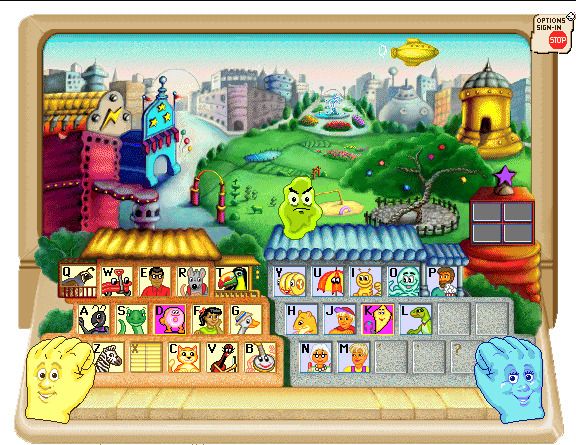
Each letter on the keyboard is the home of a different character (letter), which helps cement "where" they are in your child's brain. Following is a semi-narration from my Youngest about the program:

Most of the time each letter goes into the Movie Theater, where there is a 10(-ish) question quiz, usually identifying the first letter sound of a word (the child types the letter they are learning if it is the correct beginning sound, and a space if it isn't). Once past that, the might go to the Video Store, where you hear middle letter sounds, or to the Circus Stand where there are ending letter sounds. 

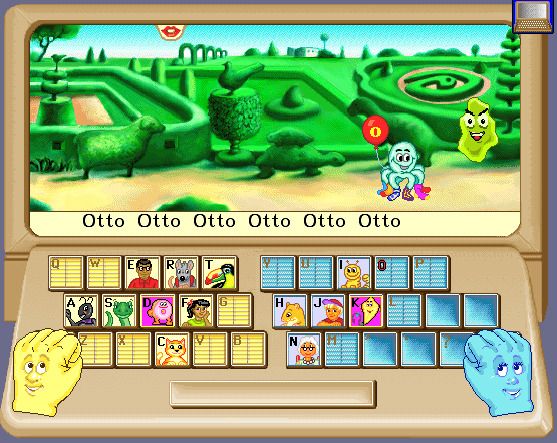
There is a villain in this game, Vex Virus, who tries to kidnap the letters, in order to end stories for all time. The task of the child is to type the correct word(s) in a variety of locations. In the Garden, a word or phrase must be typed repeatedly, 
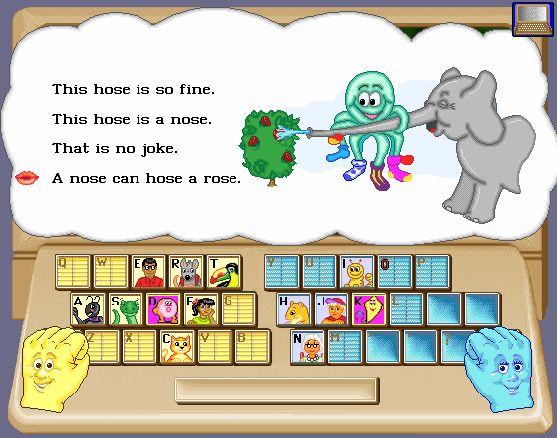
and in the StoryTree, entire sentences must be typed. 

There are some locations that the child can choose to visit once they've gotten a few letters under their belt. The Fountain checks their speed and accuracy, The Blimp chooses random letter sounds to review. The Email Tower lets your child write a short story, which they can send to another random user (often from a different country). Then they will send a story back. 

This story went from my son to Australia,


and he received this email back from "Zoe, aged 7, Australia"


The letters are learned in groups of 4 for each level. At the end of the level, they go to visit Vexor's Spaceship., where there is a longer quiz. When completed, a Certificate of Merit is earned, and stored in the The Hall of Fame.  The Certificates of Merit show the speed and score earned for that level.
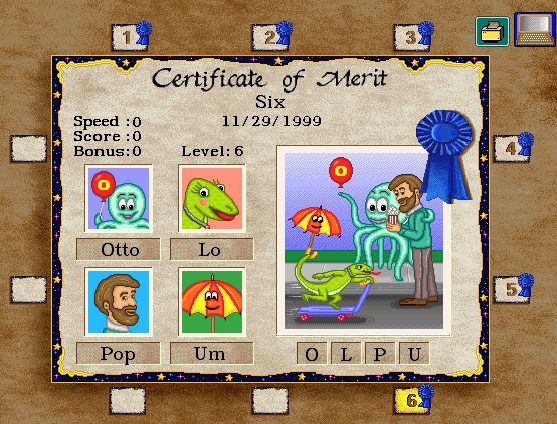
This is an engaging program that teaches children using a multiplicity of input, Audio, Visual, and Tactile, which all help the brain retain the material more readily, and can be used by all types of learners. Although "some" of the content was "cheesy" to my son, he really has enjoyed using the program, and I expect that he will continue to log on and practice his keyboarding skills throughout the year.

Not So Nutty Nitty Gritty 
You can visit Talking Fingers Inc's Social Media pages on Facebook, YouTube, and Twitter

Please click the banner below to visit the TOS Review Crew and see what others had to say. As always, I hope that this review was useful to you as you choose where best to spend your homeschool budget.
Blessings~


Click to read Crew Reviews
Crew Disclaimer

Wednesday, January 27, 2010

Keyboarding for the Christian School

My goodness, when I was in school, and in 7th grade, "Keyboarding" (or rather "Typing" back then) wasn't offered until High School. However, with today's "electric culture", and the rampant use of what I will call "Text slang" (ie... gr8, when will i c u, l8r? ) it could be highly beneficial to start your children on "keyboarding" skills earlier rather than later. ;)

To this end, the TOS Crew was provided with with free copies and asked to review either "Keyboarding for the Christian School, Revised Edition" (grades 6 and up $15.95) and/or "Keyboarding for the Christian School, Elementary Edition" (grades k-5 $12.95), by Leanne Beitel.
(*Note: There is a sale currently with a bundle of both titles for $22, and there is a coupon code for $5 off a $12.95 purchase through February 28, 2010 ... I'm not sure how long the Bundle sale is going on, but this would give you both titles for $17.... click on either picture below to go to the website)

Keyboarding for the Christian School e-book
My 7th-grader has been using the older version and now that my 4th grader is mostly recovered from his tonsillectomy, and getting back into the swing of things, I think that I will have him work on the "Elementary Version" of this course as well.
Elementary Version E-Book
So~ What are my thoughts on this program? I generally don't list my "Cons" first, but in this case, since there really is only one, I'll get it out of the way.
Generally speaking, there are more fun ways to learn to use the actual letters on the keyboard, (I'm thinking online/computer programs) but if you prefer to use a "print" program versus a computer program, and would like to have strictly Christian text, etc..., then this is a very good choice

However, what I am finding very useful are the lessons on various formatting skills. Here is a list of those covered (from the table of contents) in the Regular version: (The Elementary Version only covers a portion of these, as can be expected)
  • Enumerated Lists
  • Tab Key
  • MLA Reports
  • APA Reports
  • Cover Page
  • Works Cited
  • Bibliography
  • Personal-Business Letters
  • Business Letters
  • Envelopes
  • Proofreader’s Marks
  • Timed Writings
  • Timing Scale
Each lesson contains directions for formatting and computer screenshots to illustrate and or clarify the desired result and/or process. The samples for typing are all reasonable, wholesome, texts, with an overtly Christian tone. (I think the APA Academic Report Lesson would be a little "heavy" for my Middle-schooler, but your mileage may vary.) I remember typing class in high school, and the samples we had to type often bordered on either the ridiculous, or the irritating, so this is a nice change.

I am very thankful to have been allowed to review this program, because although it doesn't contain "bells and whistles", it seems to me to be a good, solid practical program for learning the keyboarding/typing skills (particularly "formatting skills") that will last a lifetime( and as a bonus, it should presumably be worth at least .5 credits for a high school transcript! GREAT!)

If you would like to check out some samples, they are available at the "Freebie" tab on the main page, and if you would like to see what other TOS Crew members had to say about their cruise with this typing program, please hop on over to the TOS Crew Blog, and check out some other reviews.

As always, I hope that this review was helpful to you as you make choices about what purchases will best suit your family. Blessings~


Followers

LinkWithin

Related Posts with Thumbnails